
Quick answer: Most US businesses overpay for automation tools they barely use because nobody tells them which workflows pay back in 90 days and which ones are a two-year project. Business automation AI runs $0 to $500 a month on no-code tools for straightforward workflows; anything above that without a clear ROI model and a named process deserves a hard second look.
If you are searching for business automation AI, you already know your team is spending too many hours on work a system should handle. What you do not know is which processes are worth automating first, and which tools are built for a business your size.
By the end of this article, you will know which seven workflows deliver measurable ROI within 90 days, how to score your own processes so you pick the right one first, and how to tell whether a platform is genuinely suited to your operation before you sign up for anything.
What Business Automation AI Actually Is
The Core Definition
Machine learning models running inside your existing business processes. That is the core of business automation AI, and it is meaningfully different from what most teams have tried before.
How It Differs From RPA and Chat bots
RPA is a script that breaks when the screen changes. A chatbot is a decision tree that breaks when the question changes. Business automation AI does neither. It reads what is in front of it, handles unstructured data, and makes low-stakes decisions without waiting for a human. The underlying stack combines Natural Language Processing (NLP) to interpret text inputs, Optical Character Recognition (OCR) to pull data from documents, and machine learning models that improve classification accuracy over time.
Triggers, Actions and the Workflow Layer (Business automation ai)
Every automation starts with a trigger and ends with an action. Triggers and actions are the two primitives that define what fires a workflow and what it does next. Workflow automation is the operational layer that connects those triggers, decisions, and actions across your entire stack. Business process management (BPM) provides the governance frame sitting above it all: who owns each process, what the exception paths are, and how performance gets measured.
The Orchestration Layer
The orchestration layer sequences these components at runtime. It manages dependencies between steps, calls the right API connectors when data needs to move between systems, and decides in real time whether to continue automatically or route to a human reviewer. Without a well-designed orchestration layer, individual automations stay isolated and never compound into an end-to-end process.
Where the Category Is Heading in 2026
Agentic orchestration is where the category is heading in 2026. Rather than executing a fixed sequence, AI agents plan and adjust mid-workflow, calling different tools, retrying failed steps, and escalating only when genuinely stuck. The same infrastructure powering operational automation now underpins marketing automation, which means the gap between running a campaign and closing a deal is collapsing into a single connected workflow. For a deeper look, this breakdown of AI agents explains the underlying mechanics.
What the Research Says
According to McKinsey’s 2025 State of AI report, 88 percent of organizations now regularly use AI in at least one business function, and those integrating automation across departments consistently outperform those running isolated tools.
The Bottom Line for US SMBs
Realistic annual cost savings and ROI for an SMB running three to five automated workflows: $40,000 to $90,000, combining labor recovery, error reduction, and avoided hiring.
How to Choose Your First Process
The Most Common Mistake (Business automation ai)
The mistake most teams make is starting with the most exciting automation rather than the most valuable one. Excitement does not pay back.
Start With Your Bottlenecks
Process bottlenecks are your map. Find where work queues up, measure the cost of that wait, and start there. The highest-scoring candidates are almost always in document handling, data transfer between tools, or multi-step approvals running through email chains nobody tracks.
The Scoring Framework
Score each candidate on four criteria, 1 to 3 each:
| Criterion | Score 1 | Score 2 | Score 3 |
|---|---|---|---|
| Frequency | Monthly | Weekly | Daily |
| Manual effort per run | Under 15 min | 15 to 60 min | Over 60 min |
| Error rate | Rarely causes problems | Occasional rework | Frequent rework |
| Data quality | Inconsistent | Mostly structured | Clean and consistent |
Any process scoring 9 to 12 is your first automation. Anything under 6 is a future project, not a starting point.
How to Sequence Your Automation Program
Low-code builders make this practical for operations or marketing teams to ship without engineering support. The sequence matters: automate one end-to-end process completely before moving to the next. Partial automation, where a human still bridges two tools manually, captures almost none of the productivity gain and creates new failure points. Continuous improvement means revisiting each workflow quarterly as volume, data quality, and underlying tools change.
7 Business Automation AI Workflows That Deliver Real ROI
Here are the seven workflows with the highest average scores across frequency, error rate, and data quality, listed in the order most teams should build them.
1. Lead Routing and Qualification with CRM Integration
How the Workflow Runs
A lead arrives via web form. The automation enriches the record, scores it against your ICP criteria using an LLM-based classifier, routes it to the right rep based on territory and capacity, and logs every action in your CRM. Nobody copies data manually between tools.
What It Eliminates
Lead routing and qualification at this level means every downstream report, forecast, and conversion decision runs on complete data rather than whatever a rep remembered to enter. CRM integration closes the loop between marketing spend and sales action. Campaign responses from ai marketing automation tools feed directly into the pipeline without a manual hand-off. Teams that automate this report lead response times dropping from hours to under five minutes.
2. Invoice Processing and Accounts Payable
How the Workflow Runs
An invoice arrives by email in whatever format the vendor uses. OCR handles data extraction from the document, pulling line items regardless of layout. NLP maps vendor names to your internal vendor master. A rules layer checks for duplicates, PO matches, and approval thresholds. Clean invoices auto-approve and queue for payment. Exceptions route to AP with the discrepancy pre-flagged and the extracted data already filled in.
What It Eliminates (Business automation ai)
End-to-end invoice processing drops from two to four days to under 60 minutes for 80 percent of invoices. Data extraction accuracy on structured invoices exceeds 99 percent on modern platforms, compared to the 1 to 4 percent error rate of manual entry.
3. Approval Workflows and Internal Ops
How the Workflow Runs
Approval workflows are the connective tissue of operations, and they are almost universally run through email chains that nobody tracks. These are inherently multi-step workflows: each hand-off is a discrete action with its own trigger, condition, and outcome. The automation collects the request, validates completeness, identifies the correct approver based on policy and org structure, sends a structured notification, and escalates automatically on non-response.
What It Eliminates
Every step is logged for the audit trail, which matters the moment a compliance review happens. Email chasing, lost requests, and approval delays that hold up projects are eliminated from day one.
4. AI On boarding Automation for New Clients or Employees
How the Workflow Runs (Business automation ai)
When a new client signs or a new hire starts, the same sequence always follows: document collection, account provisioning, welcome communications, training assignments, and kickoff scheduling. Every step can be automated.
What It Eliminates
This is one of the fastest-payback workflows because the cost of a bad first experience, whether churn or a costly rehire, is high relative to the automation investment. On boarding automation also produces one of the cleanest compliance and governance paper trails in the business because every action is timestamped and attributed.
5. Reporting and Dashboard Automation
How the Workflow Runs
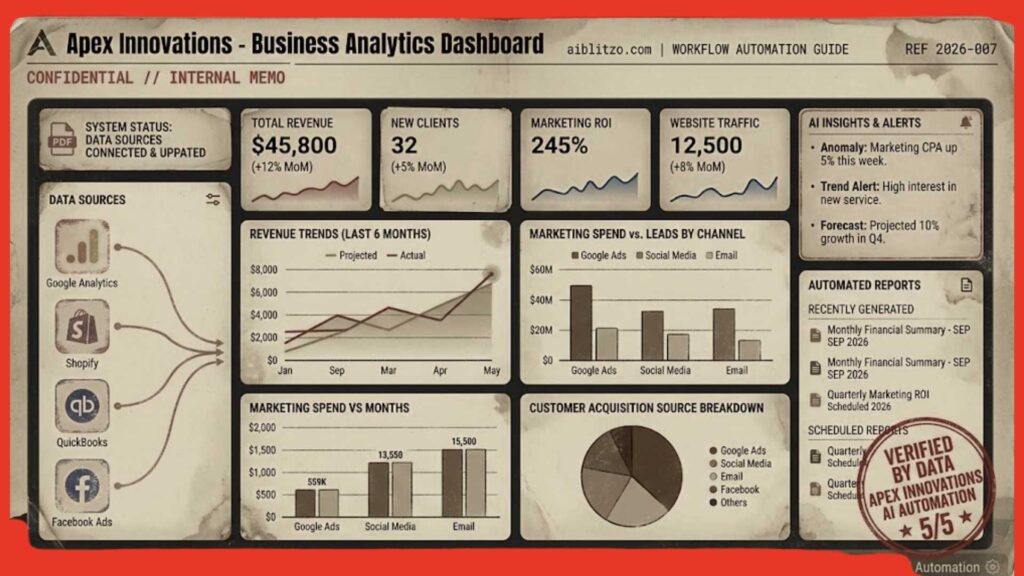
Weekly reports built manually from five different tools is a $50,000-per-year problem hiding in plain sight at most SMBs. The best AI tools for automating reporting pull data from your CRM, ad platforms, finance tools, and ops systems, reconcile it on a schedule, and push a formatted summary to the right people without anyone touching a spreadsheet.
What It Eliminates
Real-time processing of incoming data means dashboards reflect current performance, not yesterday’s snapshot. Manual assembly time of 3 to 8 hours per week, version control chaos, and the reporting lag that turns last week’s data into last month’s decisions are all removed.
6. AI Voice Agent for Small Business Phone Answering
How the Workflow Runs (Business automation ai)
The average small business misses 62 percent of calls when staff are occupied. An AI voice agent handles inbound calls after hours, qualifies the caller, books appointments into your scheduling system, and escalates genuine emergencies to a human reviewer.
What It Eliminates
For home services and trades businesses, the ROI is immediate and measurable: a booked appointment has a specific dollar value you can track from day one. After-hours coverage gaps, missed call revenue loss, and receptionist costs for businesses that do not need a full-time front desk are all eliminated.
7. AI Marketing Automation for Small Teams
How the Workflow Runs
Most marketing automation platforms now offer SMB pricing tiers that put genuine AI capability within reach of a five-person team. Modern ai marketing automation tools go well beyond email scheduling. They monitor behavioral signals, trigger personalized sequences based on what a prospect actually did, and feed outcomes back into your CRM automatically.
What It Eliminates
Teams that connect their marketing automation stack to their broader operational workflows, rather than running them in a silo, see a compounding effect: marketing data improves lead scoring, which improves lead routing and qualification, which improves close rates. The productivity gains here flow downstream into sales and ops, not just the marketing function.
Where Influencer Marketing Fits (Business automation ai)
Some teams also use this layer to support influencer marketing operations: automating contract routing, tracking deliverable deadlines, aggregating performance data across platforms, and triggering payments on milestone completion. The creative and relationship decisions stay human; the operational workflow around them does not have to.
Best AI Automation Platforms Compared (2026)
How the Landscape Splits
The platform landscape splits into three tiers. Which one fits depends on your technical capacity and process complexity.
Tier 1: No-Code Platforms for Business Users
Zapier, Make, and Power Automate are fast to deploy with broad app coverage and enough native AI actions to build all seven workflows above without writing a line of code. These are the right starting point for teams learning how to build AI workflows with no code for business and those without a dedicated technical resource. These platforms also serve as the entry point for teams running ai marketing automation tools who want to connect campaign outputs to operational workflows without a developer.
Tier 2: Technical High-Control Platforms
n8n is available self-hosted or in the cloud. The self-hosted vs cloud decision here is a genuine architectural choice: self-hosted keeps your data on your own infrastructure, which matters for HIPAA, SOC 2, or any workflow touching sensitive customer data. Cloud gives faster on boarding and managed updates.
Tier 3: Agentic Platforms for Complex Processes
Salesforce Agent force, Lindy, and UiPath Autopilot handle multi-step reasoning without explicit workflow mapping. API connectors at this tier reach into ERP, HRIS, and custom databases, not just the SaaS tools available in Tier 1. These are the right choice when your processes involve significant judgment, exception handling, or cross-system orchestration that a visual workflow builder cannot express cleanly.
| Platform | Best Fit | Tech | Agentic | Pricing | Self-Host? | Free Tier |
| Zapier | SaaS integrations | No-Code | Basic | Tasks | No | Yes (100 tasks) |
| Make | Visual workflows | Low-Code | Moderate | Operations | No | Yes (1k ops) |
| n8n | Developer workflows | Low/Pro | High | Executions | Yes | Yes (Self-hosted) |
| UiPath | Enterprise RPA | Pro-Code | High | Seats/Bots | Yes | Yes (Community) |
| Power Automate | Microsoft ecosystem | Low-Code | Moderate | License | Yes | Yes (Limited) |
| Lindy | AI team members | No-Code | Very High | AI Credits | No | Trial only |
| Agentforce | Salesforce CRM | Low/Pro | Very High | Usage/Seats | No | No |
Governance, Compliance and Keeping Humans in Control
The Three Non-negotiable (Business automation ai)
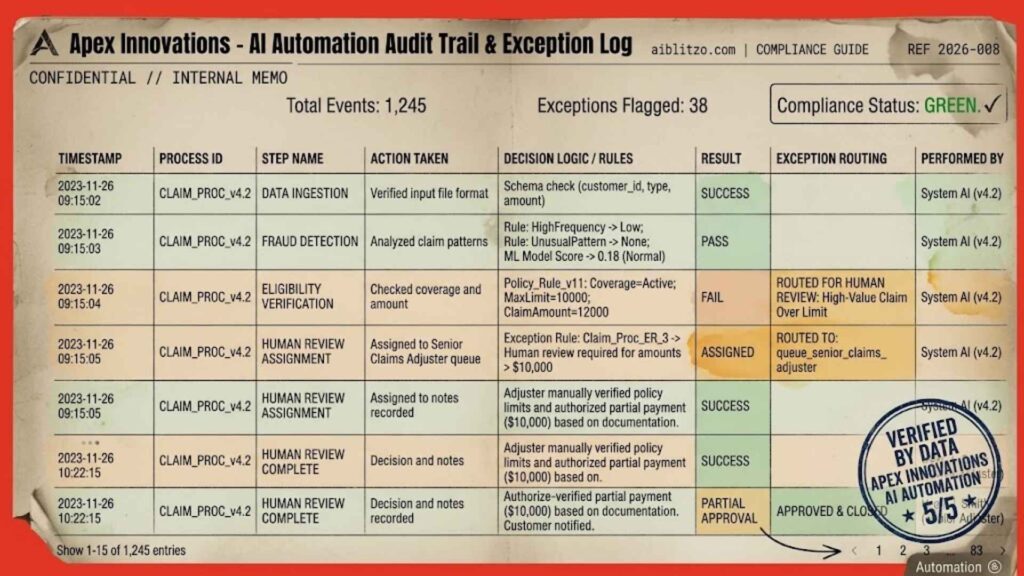
Every production automation system needs three things most teams forget to build in: a defined exception path, a complete decision log, and an easy kill switch.
Designing Exception Handling Correctly
Exception handling is not a fallback mechanism; it is a designed route. For every workflow, define explicitly what happens when AI confidence drops below threshold, when data is missing, or when an input arrives outside expected parameters. Human-in-the-loop checkpoints on high-risk steps are non-negotiable for most US companies, particularly in finance, legal, and customer-facing processes.
What Audit Trails Must Capture
Audit trails must capture inputs, outputs, confidence scores, and any manual overrides, not just final outcomes. If a workflow made a wrong decision, you need to reconstruct exactly what it saw and why it acted as it did. Real-time processing of exception alerts, rather than batch end-of-day reports, is what lets a lean team catch a failure before it reaches a customer or triggers a compliance event.
Industry-Specific Compliance Requirements (Business automation ai)
Compliance and governance requirements vary by industry. HIPAA, SOC 2, and CCPA each impose different constraints on what data can flow through an automated system and how decisions must be logged. The practical question for every workflow: if this system made a wrong decision at 2am on a Saturday, who gets the alert, and can they pause it in under five minutes without calling a developer?
The Kill Switch Requirement (Business automation ai)
The kill switch is the most under specified requirement in most automation builds. Define it before go-live, not after the first incident.
The Discipline That Makes It Compound
Continuous improvement means treating each workflow as a product: version it, measure it, and revisit it when volume or data quality changes. Predictive insights from your automation logs tell you where to invest next. Scalability comes from this discipline, not from the platform.
FAQS (Business automation ai)
Q: Can I Build AI Workflows Without Coding?
Yes. Zapier and Make both support no-code AI workflow building. You can connect triggers, AI actions, and output steps without writing code. For complex conditional logic or custom integrations, n8n or a developer is the right call.
Q: What ROI Can a Small Business Expect From AI Automation?
A typical US SMB automating three to five workflows can realistically save $40,000 to $90,000 annually through recovered labor hours, error reduction, and avoided headcount. Payback period is usually three to six months.
Q: Which Process Should I Automate First?
Use the scoring framework in this article. Score each candidate on frequency, manual effort, error rate, and data quality. Any process scoring 9 to 12 is your starting point. For most SMBs that is either invoice processing or lead routing and qualification.
Q: Is AI Automation Safe for Customer-Facing Processes?
With proper governance, yes. You need a defined exception path, a complete audit trail, human-in-the-loop checkpoints, and a pause mechanism that does not require a developer. Without those four elements, a failing automation is worse than manual handling.
Q: What Is the Difference Between RPA and Business Automation AI?
RPA follows fixed rules and breaks when inputs change. Business automation AI reads context, handles variation, and adapts when formats or conditions shift. RPA works well for perfectly structured, repetitive tasks. AI automation handles the document-heavy, variable, judgment-dependent processes that RPA was never built for.
Start With One Process
What Changes When You Get This Right
The businesses that get business automation AI right do not start with a platform decision or a company-wide rollout. They start with one process, score it, build it, measure it, and expand from there.
Your Next Step
Your stack, your team size, and your budget are not barriers. They are inputs to a decision that has a right answer, and the scoring framework in this article gives you that answer in under an hour.
If you want help identifying which process fits your operation and what the build actually looks like, get a process audit from the Aiblitzo team.

1 Comment
Pingback: AI and Automation for Small Business: 7 Quick Wins