
AI and automation means software that handles your repetitive work and makes simple decisions along the way. Small teams lose hours each week to data entry, slow replies, and manual follow-ups. Workflow automation with AI fixes that without a developer, and aiblitzo tests these setups on real small business workflows. By the end of this blog, you will know the difference between AI vs automation, seven quick wins to start with, the best AI automation tools for beginners, what it costs, and how to stay safe.
What AI and Automation Mean for a Small Business?
Automation follows rules you write. If a form is submitted, send a receipt. AI handles the judgment calls that rules cannot cover. AI automation adds that judgment to workflow automation, so the software does the repetitive tasks and decides what to do when the input is messy.
That is the short AI automation definition. In simple terms, it is a digital assistant that works through your routine tasks and thinks a little along the way.
Here is a quick example. A customer emails, “My parcel never showed up.” A basic rule can only send a generic receipt. An AI-powered workflow reads the message, spots a delivery complaint, finds the order, and drafts a reply for you to approve.
Three technologies sit behind that behavior:
- Machine learning finds patterns in past data, which is pattern recognition at scale.
- Natural language processing (NLP) lets software read and write human language.
- Large language models (LLMs) such as ChatGPT from OpenAI power most generative AI tools. They produce text, summaries, and answers on request.
Think of AI as the brain and automation as the hands. The brain decides, and the hands do the work.
How AI and Automation Work Together?
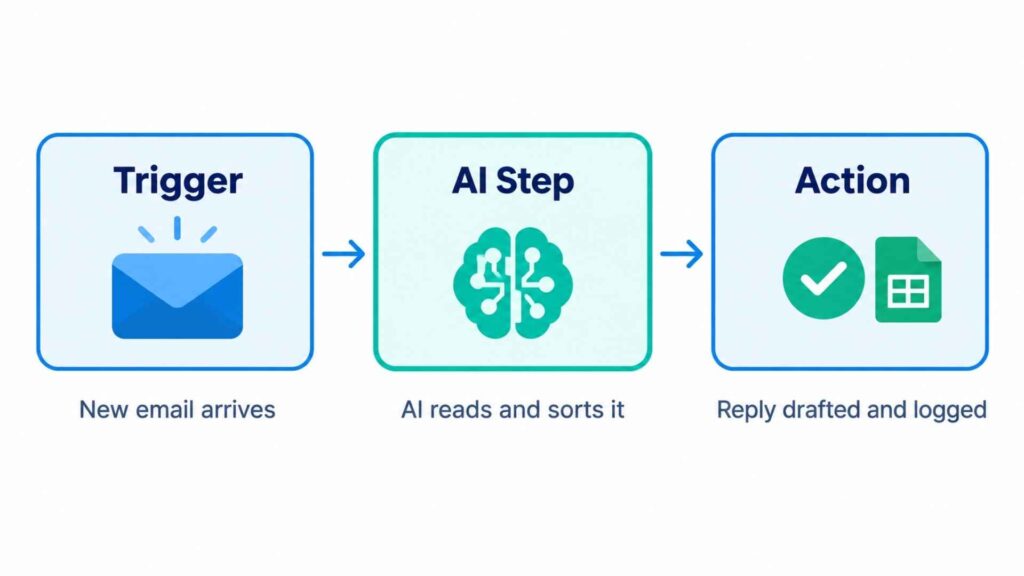
Every automated workflow has the same bones. Once you see them, the tools stop looking mysterious.
- Trigger: something happens, such as a new email, a form entry, or a paid invoice.
- AI step: a model reads, sorts, or writes. It might label the email, pull data from a PDF, or draft a reply.
- Action: the result goes somewhere useful, such as a CRM record, a spreadsheet row, or a Slack message.
Triggers and actions connect through API integration, which lets two apps swap data without you. Webhooks are the doorbell: one app rings, and another answers instantly. You will rarely touch either directly, because no-code tools handle them for you.
AI vs Automation: What Is the Difference?
Many people treat the AI vs automation question as a choice between two options. It is not. Automation repeats a fixed path. AI adapts to what it sees.
| Feature | Traditional automation | AI automation |
|---|---|---|
| Logic | Fixed if-then rules | Learns and interprets |
| Input it handles | Structured data (forms, fields) | Unstructured data (emails, PDFs, voice) |
| Decision-making | None, follows the script | Chooses between options |
| Setup | Quick for simple tasks | Needs clear examples and testing |
| Breaks when | Input changes format | Output drifts, so it needs checks |
| Example | Send a receipt after payment | Read a complaint and draft a reply |
The gap that matters most is unstructured data. Rule-based automation chokes on a scanned invoice or a rambling email. AI reads both without complaint.
AI Automation vs RPA, Machine Learning, and AI Agents
RPA vs AI automation. Robotic process automation, the category UiPath built its name on, copies clicks and keystrokes. It is fast and literal. AI automation adds understanding on top.
Machine learning. It is one ingredient, not the whole dish. ML spots patterns, and automation turns them into action.
AI agents. An agent plans its own steps toward a goal. A workflow follows steps you drew in advance. Our guide to AI agents explained separates the hype from what works.
Two related terms are worth knowing. Intelligent automation is the industry label for RPA plus AI. Hyperautomation means automating as many business processes as possible, which suits large enterprises more than a five-person shop.
7 Quick Wins From AI and Automation
These seven tasks share three traits. They repeat often, they follow a pattern, and a mistake costs little. Start here.
1. Lead Capture and Follow-Up
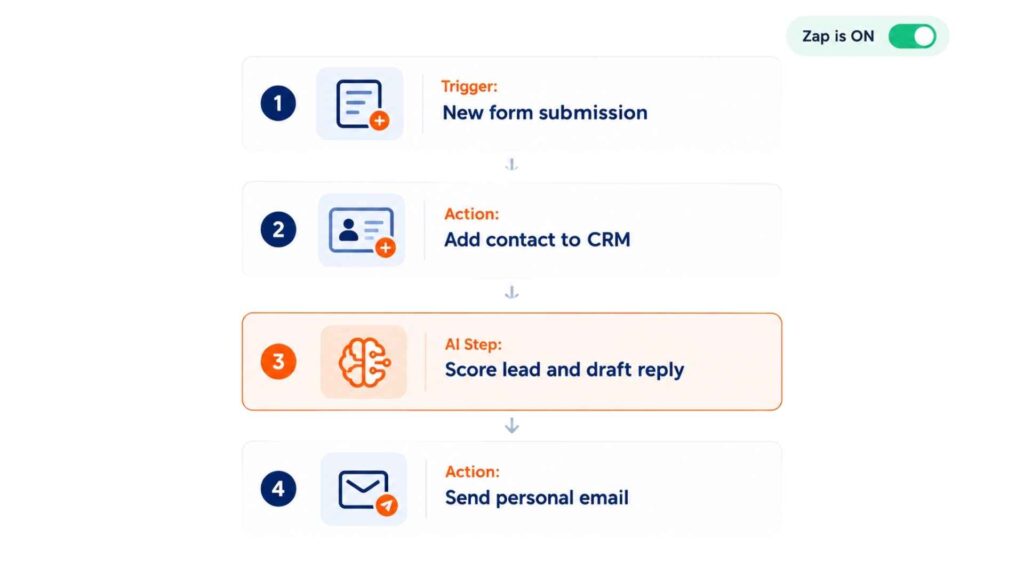
A form fills out, and a tool adds the contact to your CRM. AI scores the lead from the message, and an email automation sends a personal first reply within minutes.
Speed wins deals. Replies within five minutes convert far better than replies the next day.
Tools: Zapier or Make with ChatGPT. Typical saving: 3 to 5 hours a week.
2. Voicemail and Inbox Triage
AI transcribes voicemails and sorts emails into urgent, routine, and junk. You open a short summary instead of forty messages.
Our AI-powered voicemail guide shows the full setup.
Tools: a transcription service plus Zapier. Typical saving: 2 to 3 hours a week.
3. Customer Support First Response
Chatbots answer routine questions about hours, shipping, and returns. Hard cases pass to a person with the conversation attached. This is customer support automation at its simplest.
Tools: a chatbot builder trained on your FAQ page. Typical saving: 30 to 50 percent of repeat tickets.
4. Invoice and Document Processing
Here AI earns its keep. It reads an invoice, extracts the supplier, date, and amount, and writes them to your accounting sheet. No retyping.
Large insurers use the same idea at scale. State Farm AI claims automation, for example, is built around reading documents and routing cases faster. A small business gets the same benefit on a smaller pile of paper.
Tools: Make with a document-reading step. Typical saving: 4 hours a week per 100 invoices.
5. Content Drafts and Social Scheduling
Content generation turns one idea into a blog outline, three posts, and a newsletter intro. Social media scheduling tools then publish them at the right times.
Keep a human editor in the loop. AI drafts quickly, and your voice makes it worth reading.
Tools: ChatGPT plus a scheduler. Typical saving: 5 hours a week.
6. AI Marketing Automation
Segment your list by behavior, write subject line variants, and send follow-ups based on clicks. AI marketing automation does the sorting that used to eat Friday afternoons.
Want more ideas? Our post on business automation AI workflows that pay off covers seven more.
Tools: your email platform plus Zapier. Typical saving: 3 hours a week.
7. Weekly Reporting and Meeting Notes
Pull sales numbers, ad spend, and support counts into one summary every Monday. Record meetings, then turn the transcript into action items automatically.
This is a basic AI workflow automation, and it removes the dullest hour of the week. See AI workflow automation things you must know for the deeper version.
Tools: Make or n8n with a spreadsheet. Typical saving: 2 hours a week.
Best AI Automation Tools for Beginners
You do not need coding skills. The best AI automation tools for beginners use drag-and-drop builders. No-code tools cover most needs, and low-code platforms add optional scripting for people who want more control.
| Tool | Best for | Skill level | Starting cost (check current pricing) |
|---|---|---|---|
| Zapier | Connecting thousands of apps fast | Beginner | Free plan, paid from about $20 a month |
| Make (formerly Integromat) | Visual, multi-step workflows | Beginner to intermediate | Free plan, paid from about $10 a month |
| n8n | Flexible, self-hostable workflows | Intermediate | Free if self-hosted, cloud from about $20 a month |
| Microsoft Power Automate | Teams already on Microsoft 365 | Beginner to intermediate | Often bundled, premium from about $15 per user a month |
| UiPath | RPA for larger, legacy-heavy processes | Advanced | Quote-based for most plans |
Beginners should open Zapier or Make first. If you like owning your data, compare n8n with its rivals in our guide to n8n vs Activepieces. The guide to workflow builders covers the wider field.
How Much Does AI Automation Cost?
A starter setup runs about $20 to $60 a month for tools. Add the AI usage itself, such as a ChatGPT plan at roughly $20 a month. Custom builds by an agency cost more, but most small teams never need one.
Measure return on investment (ROI) with a simple sum:
- Hours saved per week × your hourly rate × 4 = monthly value
- Example: 5 hours × $25 × 4 = $500 a month
- Tool cost: $40 a month, so the net gain is $460
Time savings arrive first. Cost reduction and scalability follow, because the same workflow handles ten customers or a thousand with no extra payroll.
Is AI Automation Safe? Risks, Privacy, and Jobs
It is safe when you set limits. Three rules cover most of the risk.
Keep human oversight. Let people approve anything that touches money, contracts, or angry customers. AI is excellent at drafts and unreliable at final calls.
Protect data privacy. Never paste customer details into a tool without checking its data policy. In the UK, UK GDPR applies. In the USA, the rules vary by state and sector. Anyone serving European customers should treat GDPR as the baseline.
Use a risk framework. The NIST AI Risk Management Framework gives a plain checklist for mapping and reducing AI risk. IBM’s overview of AI workflow automation and Salesforce’s guide to AI automation both explain how larger firms govern these systems.
Will AI automation replace jobs? It replaces tasks far more often than people. The hours you win back go to selling, creating, and caring for customers. Those are the parts of the job a model cannot do.
How to Start With AI and Automation in 5 Steps?
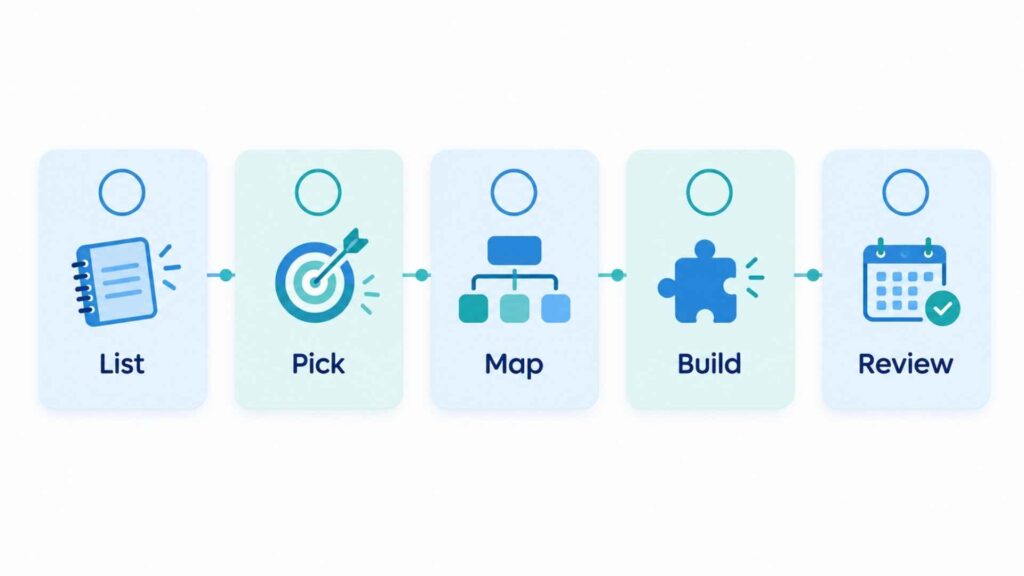
- List your repeat tasks. Track one week. Circle anything you did more than three times.
- Pick one. Choose the task with a clear trigger and a low cost of error.
- Map the flow. Write the trigger, the AI step, and the action on a sticky note.
- Build it in a no-code tool. Use Zapier or Make, and test with ten real examples.
- Review weekly. Check outputs, fix errors, then add the next task.
Planning something bigger? Our IT process automation plan lists seven mistakes to avoid, and business automation services explains when hiring help makes sense.
Quick Answers
Is AI automation the same as machine learning? No. Machine learning is one method inside it. AI automation also needs triggers, tools, and actions.
What is AI automation in the UK or the USA? The idea is identical. Only the rules differ, with UK GDPR in Britain and state-level laws across the United States.
Do I need coding skills? No. Most beginner workflows run on drag-and-drop tools.
What Changes After Your First Automation?
Pick one task from the list this week and build it. By next Monday you will have hours back and a workflow that runs without you. The second one takes half the time.
Ready to move faster? Learn how AI automation can improve your business, explore our AI automation solutions, and contact us to get started.

2 Comments
Pingback: ChatGPT Rank Tracking Tool Guide 2026 | Best AI Visibility Tools
Pingback: AI Workflow Automation: Things You must Know in 2026