
Most people still treat their voicemail like a 1990s answering machine. Messages pile up unheard, greetings sound robotic, spam fills the box, and important calls die after hours. After reading this you will know exactly how to check, transcribe, greet, and manage voicemail messages with current AI tools on iPhone, Android, Google Voice, and major carriers so nothing important is lost again.
What Modern Voicemail Systems Actually Are in 2026
A modern voicemail system records a caller’s message when you cannot answer, then notifies you by push notification or email notification. Visual interfaces let you see the list of messages, play them in any order, and read a transcript without dialing in.
Older answering machines simply recorded audio on a cassette or hard drive. Today’s voicemail systems run on carrier networks or PBX / VoIP systems, store messages in the cloud, apply spam filtering, and often deliver automatic transcription. Storage limits still exist, so full boxes stop new messages from landing.
How to Check Voicemail on Every Major Platform
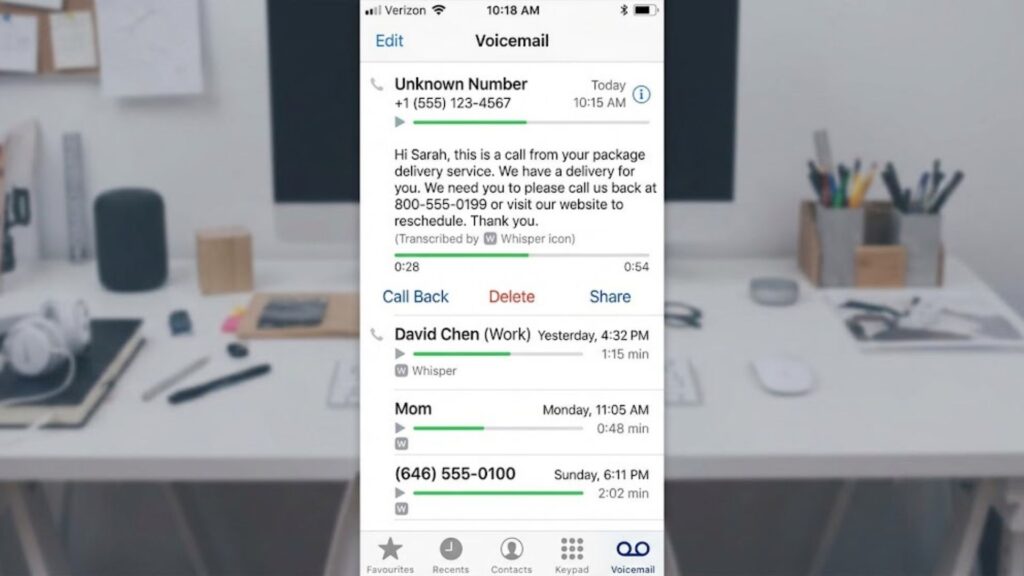
On iPhone, open the Phone app and tap the dedicated tab. Apple iOS Visual Voicemail shows the list with transcripts if your carrier supports it. To set up AI transcription on iPhone, enable the visual feature and turn on Live Voicemail or the carrier’s transcription option in Settings.
Android users open the Phone app, tap the three-dot menu, then the messages section. Many devices use Android Visual Voicemail or the Google Phone app.
Google Voice users open the app or voice.google.com, go to the voicemail area, and can turn transcripts on or off. Text conversion for Google Voice works automatically in supported languages once enabled.
AT&T, Verizon, and T-Mobile each have their own apps or dial-in codes (*86 is common). If you forget the password, use the carrier app or account portal for a password reset. Voicemail retrieval works the same way across all of them: select the item and play or read it.
To access voicemail from another phone, dial your own number, wait for the greeting to start, then press * or # (carrier-dependent) and enter your password.
For step-by-step visuals on any device, see this practical guide to checking messages and this setup overview.
How to Create a Professional Voicemail Greeting with AI
A weak greeting costs callbacks. You can generate a professional voicemail greeting in minutes without recording yourself.
Write a short script: name or company, reason you cannot answer, and a clear request for the caller’s details. Keep it under 25 seconds.
Paste the script into a free text-to-speech tool. The best free AI text to speech currently produces natural results with minimal robotic tone. ElevenLabs free tier and similar services let you choose a professional voice, generate the MP3, and download it. Watch your usage so you avoid ElevenLabs credits running out fast.
For a custom AI voice for business use, upload a 30-second sample of your own voice or pick a realistic pre-training option. This creates a consistent custom greeting that works on any carrier or VoIP system.
One UK sales team replaced their generic carrier voicemail with an AI-cloned version that stated the company name and promised a two-hour callback. Callers responded more often because the voice sounded human.
If you need scripts, free AI script generator tools and templates cover business hours, after-hours, and sales outreach. Edit, generate, upload. This is exactly how to create an AI voicemail greeting for business without hiring a voice actor.
How to Transcribe Voicemail Audio and Get AI Summaries
Listening to every voicemail wastes time. Transcription turns audio into searchable text.
The easiest free way is to download the audio (most carriers let you save or forward it) and run it through OpenAI Whisper. How to convert voicemail audio to text with Whisper takes three steps for a non-engineer:
Export the audio file from your phone or email.
Upload it to a free Whisper interface or run the open-source model locally.
Copy the transcript.
How accurate is current AI transcription today? On clear speech it reaches 90% or higher. Accents, background noise, and short clipped messages drop the accuracy rate, but recent models still outperform older carrier transcripts. Multi-language support covers English, Japanese, and many others.
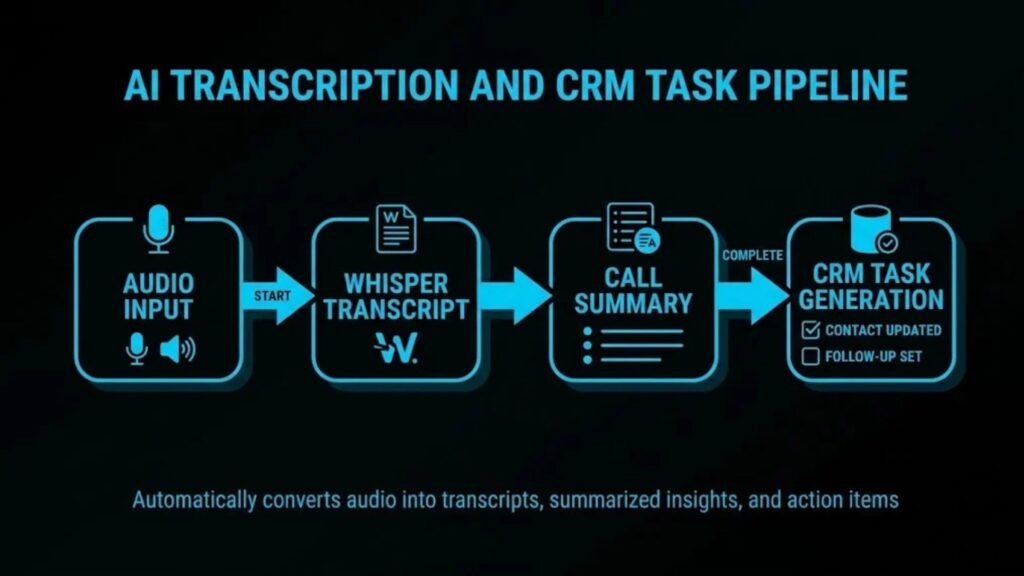
For sales teams, AI summary tools go further. They extract action items, flag urgency detection, and run sentiment analysis so high-intent voicemail messages surface first. Some platforms push the summary straight into CRM integration or send an email notification.
How to build simple AI voicemail transcription pipelines: forward messages to an email address, use a Zapier-style automation or a small script to send the attachment to Whisper, then post the text and summary to Slack or your CRM. Turning voicemail audio into text with AI for free is fully possible this way.
| Feature / Metric | Free OpenAI Whisper (Open-Source / Self-Hosted) | Paid Carrier Voicemail Transcription (AT&T, Verizon, T-Mobile) | Dedicated AI Tools (Otter.ai, Fireflies.ai, Rev, Notta) |
| Accuracy (Word Error Rate) | Very High (~8–12% WER) Near-human accuracy on clear audio. Excellent noise handling, though occasional hallucinations on trailing silences. | Low to Moderate (~20–35% WER) Struggles significantly with background noise, low bitrates, fast talkers, and heavy accents. | High to Very High (~5–10% WER) Custom domain vocabulary, active noise suppression, and real-time speaker separation. |
| Language Support | 98–100+ Languages Built-in automatic language detection and translation to English. | 1–2 Languages Primarily English and Spanish (varies by carrier and plan). | 30 to 100+ Languages Varies by vendor; includes real-time translation and localized summaries. |
| Speaker Identification | ❌ No native diarization (Requires external libraries like PyAnnote or custom pipelines). | ❌ No Assumes single-caller voicemail messages. | ✅ Native Diarization Automatically identifies and labels multiple distinct speakers. |
| Key Features | Open-source flexibility, customizable model sizes (tiny to large-v3), offline local execution. | Native phone integration, SMS notifications, instant delivery upon voicemail receipt. | Live meeting bots, CRM sync (Salesforce/HubSpot), action-item extraction, AI summaries. |
| Cost & Model | $0 / Free for open-source weights (Requires developer setup or self-hosted GPU infrastructure). | $2.99 – $4.99 / month per line (or bundled in premium carrier plans). | $10 – $30+ / user / month (Free tiers usually limit transcription minutes to ~300 mins/mo). |
How to Stop Voicemail Spam and Fix Common Problems
Spam and full boxes are the two biggest reasons people stop checking voicemail.
Turn on call screening in the Phone app settings (iPhone or Android). Most carriers also offer spam filtering that sends known robocalls straight to a separate folder or blocks them. Delete old items regularly by selecting them in the visual interface or dialing in and following the prompts to stay under storage limits.
If voicemail is not working, check the password, confirm the visual feature is enabled, and restart the phone. A missed call that never leaves a message usually means the caller hung up before the beep or the box was full.
Business and Outbound Voicemail – Drops, Callbacks, and Compliance
Sales teams still leave voicemail because many decision-makers never answer. An AI-generated outbound voicemail can raise the callback rate when done correctly.
Best practices for AI drops: keep the message 18–25 seconds, open with the prospect’s name, state one clear reason for the call, and repeat the number twice. Answering machine detection (AMD) and beep detection help the system start speaking after the tone instead of talking over the greeting.
Ring less AI personalization inserts the recipient’s name and context so the voicemail message feels individual. Delivery rate is higher than email for some lists, but legal issues with AI ring less delivery remain. Under current TCPA rules and FCC guidance, ring less voicemail messages to mobile numbers are treated as calls and require prior express consent. Compliance rules are strict; ignoring them creates liability.
How to automate follow-up with AI: once a voicemail is left, an automation can create a CRM task, send a matching SMS, or schedule the next attempt. After-hours calls no longer have to die in the box if an AI answering service is handling the overflow. Platforms such as RingCentral, Dial pad, and Twilio already include AMD and CRM integration that make these workflows straightforward.
AI Voicemail Tools Compared
The best AI tools for voicemail in 2026 fall into three groups:
Free or low-cost transcription (Whisper-based tools, carrier built-ins)
Greeting generators with text-to-speech and voice cloning (ElevenLabs and similar)
Full AI voicemail answering services that replace traditional systems entirely
AI answering service vs traditional voicemail is a real choice. Traditional recording simply records and notifies. An AI agent can answer, qualify the caller, book a meeting, and only escalate when needed. For small businesses that miss after-hours calls, the agent often recovers more opportunities than a simple greeting and box.
For related AI workflow ideas see Claude for students and practical automation approaches in ChatGPT and Gumroad. Layout and interface tips that also apply to many AI dashboards appear in Visual Studio 2026 layout fixes.
Frequently Asked Questions
How do I check my messages?
Open the Phone app on iPhone or Android, or dial *86 / your number and enter the password. Google Voice users open the app or website.
How to set up the visual feature on iPhone?
Enable it in the Phone app settings and confirm your carrier supports it. Transcription options appear once it is active.
How to turn audio into text?
Download the audio and run it through OpenAI Whisper, or use the built-in carrier / Google Voice transcript feature.
What is the best AI for greetings?
ElevenLabs free tier and similar text-to-speech tools currently produce the most natural short greetings.
How to change the greeting?
Record a new one in your carrier app or upload an AI-generated MP3 to the settings.
Why is the system not working?
Check the password, storage limits, and whether the visual feature is enabled. Restart the phone if needed.
How to access messages from another phone?
Dial your own number, wait for the greeting, then press * or # and enter your password.
Is ring less delivery legal?
Under current TCPA rules it is treated as a call to mobile numbers and requires prior express consent.
How accurate is AI transcription?
Around 90 % on clear speech; lower with heavy accents or noise, but still better than most older carrier systems.
How to delete old messages?
Select them in the visual interface and choose delete, or dial in and follow the prompts.
Can AI summarize my messages?
Yes. Tools that use Whisper plus a large language model can extract action items and urgency in seconds.
How to set up the feature on Android (voicemail)?
Open the Phone app, go to the messages settings, and enable the visual option if your carrier supports it.
What is the visual interface?
A list-based view that lets you see, play, and read messages in any order without calling in.
How to stop spam?
Turn on call screening and carrier spam filtering; delete unknown messages without calling back.
How to create a professional message?
Write a short script, generate it with free text-to-speech, and upload the MP3 to your carrier or VoIP system.
You now have working methods for every common problem. The next time a message arrives, you can read it, prioritize it, and respond without listening to the whole recording.
If you want help building a custom AI pipeline for your team’s messages, contact the aiblitzo.com team.
Note: the title “Voicemails for Isabelle” refers to a separate film listed on Wikipedia and Netflix; this article covers practical systems only.

2 Comments
Pingback: AI Agents Explained: The Truth Behind 3 Big Myths
Pingback: AI and Automation for Small Business: 7 Quick Wins