
ElevenLabs credits running out fast after only a few scripts? The cause is usually more than one long generation. Regeneration’s, model choice, other products, API activity, and repeated testing all affect your credit consumption rate. This guide shows how to find the actual source of the burn, estimate your costs, and change your workflow before buying a bigger plan.
Already out of credits? Skip to section 8.
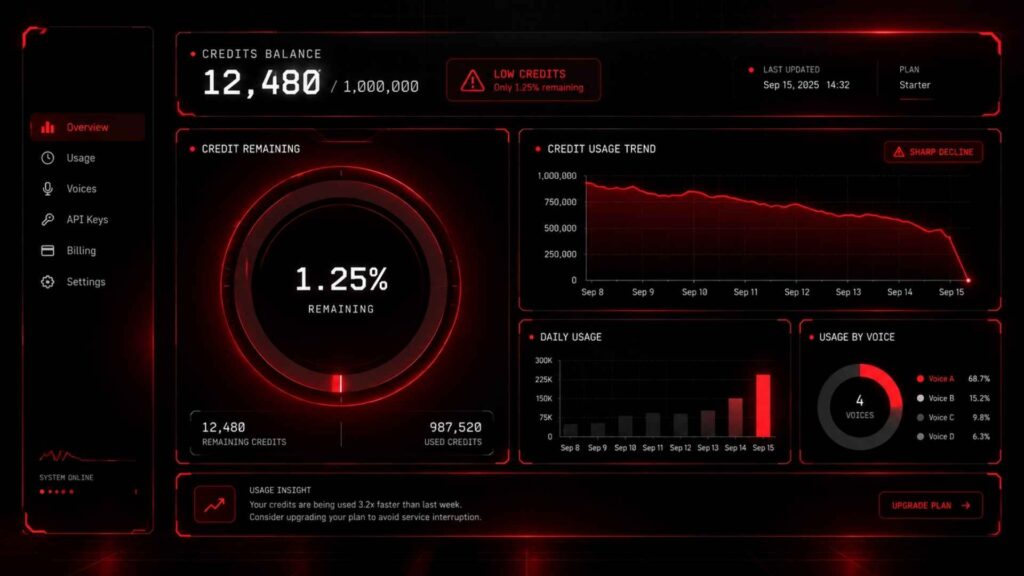
1. ElevenLabs Credits Running Out Fast? 5 Causes Ranked by Cost
The fastest way to solve a credit problem is to stop guessing.
Five causes explain most cases of ElevenLabs credits running out fast:
- Repeated generations
- Long scripts tested before editing
- Credit-heavy products used alongside TTS
- A model or API route chosen without checking its rate
- A plan that does not match your workload
For website-based Text to Speech, ElevenLabs currently charges credits based on the characters generated. Its documentation says a website generation generally costs 1 credit per text character, although some voices can have a custom multiplier.
That means a 4,000-character script is already a significant generation before you create a second take.
Read more: Perplexity vs Claude: The Ultimate Simple Guide for 2026
Regenerating the same script
Repeated takes are an easy source of waste.
ElevenLabs charges per generation request rather than per download. However, eligible website users can receive limited free regeneration’s under specific conditions. The interface shows whether the next regeneration is free before you generate it.
Testing an unedited long script
If the opening paragraph, pronunciation, pacing, or voice settings are wrong, generating the entire script creates expensive discarded generations.
Other features using the same pool
Credits are shared across products. Current pricing lists Text to Speech, Speech to Text, music, sound effects, voice tools and dubbing as products that can consume the same account credit pool.
A plan that is too small
If your workflow is already efficient but your monthly character count consistently exceeds the allowance, the problem may be capacity rather than bad habits.
2. ElevenLabs Credits Running Out Fast? Check Your Usage History First
Before changing your plan, find out where the credits actually went.
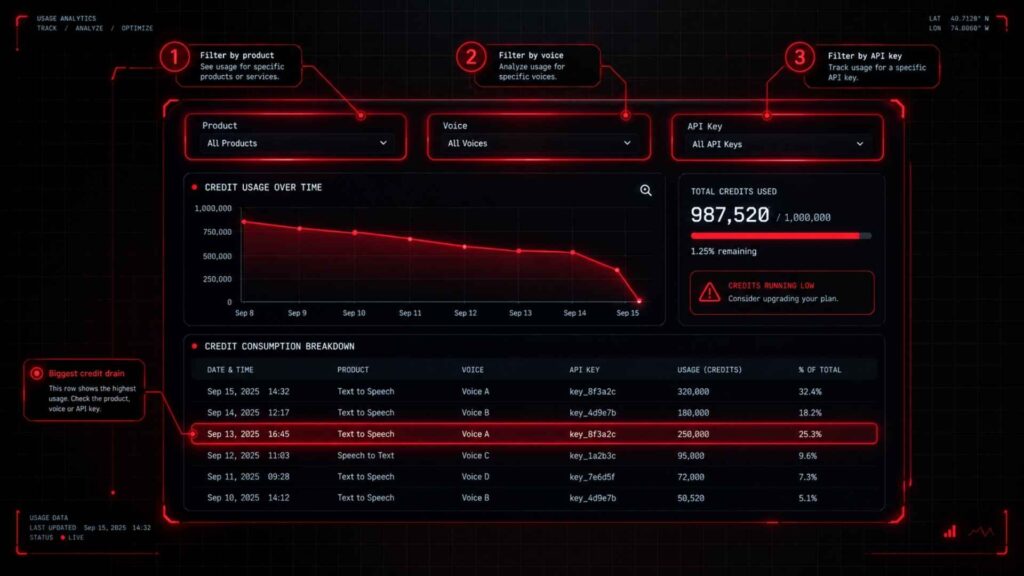
ElevenLabs provides a Usage view inside Developers → Analytics. You can filter usage by time period and break credit consumption down by factors such as voice, product, or API key. Workspace users can also examine usage by individual user or group.
Where to find it
Open your ElevenLabs account and go to:
Developers → Analytics → Usage
For API activity, open API Requests or the Request Log. You can also export usage data as CSV from Analytics.
Read more: GLM 5.3 Flash: The Stunning Free AI Shocking Experts
How to read the data
Look for unusual spikes.
| What you see | Possible cause |
|---|---|
| One voice consuming most credits | Long-form narration or repeated takes |
| One product dominating usage | Dubbing, music, STT, etc. |
| High API activity | Automated or background requests |
| Large usage on one day | Batch generation or repeated testing |
| Several users consuming credits | Shared workspace usage |
This turns “Where did my credits go?” into a measurable question.
3. Credits Convert to Characters by Model, but Website and API Rates Differ
One common source of confusion is assuming that every ElevenLabs model has the same pricing everywhere.
For website generation, ElevenLabs currently states that Text to Speech costs 1 credit per character.
API pricing is different.
Current API pricing lists v2/v3 Text to Speech at $0.10 per 1,000 characters, while Flash/Turbo are listed at $0.05 per 1,000 characters. API usage is billed in dollars rather than the website’s credit system.
| Generation route | Current pricing approach |
|---|---|
| Website TTS | Generally 1 credit per character |
| API v2/v3 | $0.10 per 1,000 characters |
| API Flash/Turbo | $0.05 per 1,000 characters |
| Speech to Text API | Billed per audio hour |
| Music API | Billed per minute |
| Sound Effects API | Billed per generation |
So there is no simple rule that “Flash always uses fewer website credits.” The route matters.
Estimate your script before generating
Take the character count of your script and multiply it by the applicable rate.
For website TTS:
Estimated credits = characters × 1
A 6,000-character generation is therefore roughly 6,000 credits before any applicable voice multiplier or free regeneration.
4. Model Choice Changes Your Bill: v3 vs Multilingual v2 vs Flash vs Turbo
Model selection still matters, but not necessarily in the way many older guides suggest. On the website, the model rarely explains ElevenLabs credits running out fast.
ElevenLabs describes Eleven v3 as its most expressive model, Multilingual v2 as a consistent option for long-form content, and Flash v2.5 as a fast, affordable model designed for low latency. Turbo models sit between speed and quality for many interactive applications.
For website TTS, the current pricing documentation says all models cost 1 credit per character, excluding possible voice-specific modifiers.
So the decision becomes more about output requirements and workflow than simply picking a cheaper website model.
Read more: GPT-6 Astra: Everything You Need to Know Before You Buy It
A 10-minute script example
Suppose your 10-minute narration contains approximately 8,000 characters.
On the website, a straightforward estimate is:
8,000 characters × 1 credit = 8,000 credits
If you generate it three times, that can become approximately:
8,000 × 3 = 24,000 credits
The lesson is simple: the number of takes can matter more than the model name.
For API users, the economics change because Flash/Turbo have discounted character pricing.
5. ElevenLabs Credits Running Out Fast? Test Short Before You Render Long
This is where many creators lose credits without noticing.
Suppose you have a 5,000-character narration. You generate it, dislike the pacing, change the voice settings, generate again, then rewrite several sentences and generate again.
The final audio may be only one file. But the workflow involved multiple generation requests.
ElevenLabs currently explains that free regeneration’s can be available in Text to Speech when the generation meets specific conditions. These include keeping the same prompt, voice and model and remaining within the applicable time window. Once those free regeneration’s are used, the interface shows the credit cost for the next generation.
Use a short test first
Instead of generating 4,000 to 5,000 characters immediately:
- Take a 200 to 500-character section.
- Select your voice and model.
- Adjust the stability slider and other voice settings.
- Test pronunciation and pacing.
- Generate again only when necessary.
- Lock the settings.
- Render the longer script.
This reduces discarded generations and makes your final render more predictable.
6. Other ElevenLabs Features Draw From the Same Credit Pool
Your Text to Speech project may not be the only thing consuming credits. A sudden case of ElevenLabs credits running out fast often traces back to products other than TTS.
ElevenLabs says its credits are shared across its products. Current listed examples include:
- Text to Speech
- Speech to Text
- Music
- Sound Effects
- Voice Changer
- Voice Isolator
- Dubbing
The current pricing page lists approximate product costs such as 330 credits per minute for Speech to Text, 900 credits per minute for Eleven Music, 200 credits per Sound Effects generation, and different per-minute rates for dubbing.
Agents also have their own usage logic. Teams using conversational AI should monitor that activity rather than assuming all consumption is ordinary TTS.
This is particularly relevant to professionals using several ElevenLabs tools from one account.
Read more: ChatGPT and Gumroad: How I Made $10,000 in One Month Easy Guide 2026
7. Stop ElevenLabs Credits Running Out Fast: Edit, Test, Draft Cheap, Render Once
The best way to make credits last longer is not to obsess over every single character.
Fix the workflow that creates unnecessary generations.
Edit and normalize the script first
Complete your script before generating.
Check:
- Names and numbers
- Pronunciation
- Abbreviations
- Sentence length
- Punctuation
- Unwanted pauses
- Repeated phrases
Good text normalization reduces the chance that you need another generation because a sentence sounds wrong.
Test one short segment
Do not test a full 10-minute narration.
Use one representative section containing the same type of sentences, numbers, names and emotional delivery found in the final script.
Draft, then render
If you are using an API workflow, compare the economics of available models before generating large batches. Flash/Turbo currently have lower API character pricing than v2/v3.
Website users should focus on reducing unnecessary takes, because the current website pricing is generally one credit per character regardless of model.
Lock your settings
Once you find the right combination of voice, similarity boost, style exaggeration, speaker boost and stability, stop changing them during the final render unless the result genuinely needs correction.
8. ElevenLabs Credits Running Out Fast? Wait for Reset, Buy Pay As You Go, or Upgrade
Running out does not always mean you need a larger subscription.
First, check your billing cycle.
ElevenLabs says subscription credits reset at the beginning of each billing cycle. Paid unused credits can roll over for up to two months, while Free-plan credits do not roll over.
If you reach zero, eligible accounts can use Pay As You Go credits. These are separate from the monthly subscription allowance and can be purchased when you need additional usage.
Current public plans include Free, Starter, Creator, Pro, Scale and Business. The current pricing page lists 10,000 credits for Free, 30,000 for Starter, 121,000 for Creator, 600,000 for Pro, 1.8 million for Scale and 6 million for Business.
Because pricing and allowances can change, check the official ElevenLabs pricing page before making a plan decision.
| Plan | Monthly credits |
|---|---|
| Free | 10,000 |
| Starter | 30,000 |
| Creator | 121,000 |
| Pro | 600,000 |
| Scale | 1.8 million |
| Business | 6 million |
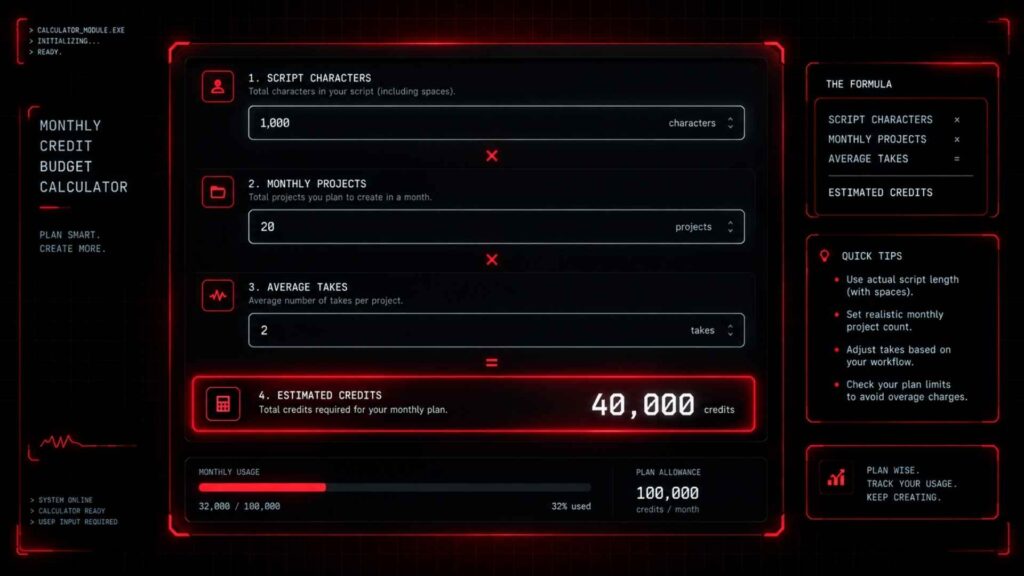
9. Your Monthly Credit Budget: Script Characters × Model Rate × Number of Takes
You do not need to guess how many credits you need. A simple budget also stops ElevenLabs credits running out fast before the month ends.
Build a simple worksheet.
Monthly usage = average script characters × number of scripts × average takes
For example, imagine a YouTuber produces:
- 8 videos per month
- 4,000 characters per script
- 1.5 average generations per script
The rough website usage is:
4,000 × 8 × 1.5 = 48,000 credits
That gives the creator a much better starting point for comparing the monthly credit allowance against actual usage.
A pod-caster producing four 10,000-character episodes with 1.2 average takes would estimate:
10,000 × 4 × 1.2 = 48,000 credits
The important number is not simply “minutes of audio.”
Your character count estimate and number of generations give you a clearer picture of TTS demand.
Read more: SEO vs GEO: Things You Need to Know Before Choosing a Route
10. Fix the Habit Behind ElevenLabs Credits Running Out Fast Before Upgrading
Before upgrading, run a simple test.
Track your next five projects.
Record:
| Metric | What to record |
|---|---|
| Script length | Characters |
| Model | v3, Multilingual v2, Flash or Turbo |
| Takes | Number of generations |
| Product | TTS, dubbing, music, etc. |
| Credits used | Before and after |
| Final audio | Minutes |
If most of your credits are disappearing through repeated generations, changing your workflow may solve the problem.
If your generation process is already efficient and your normal monthly workload still exceeds the allowance, then a plan upgrade becomes a capacity decision. It stops being a reaction to one unusually expensive project.
For teams, also check workspace seats and API concurrent requests, because multiple users or automated workloads can increase account activity. ElevenLabs provides usage breakdowns for workspace users and concurrency information through Analytics.
For more AI workflow ideas, see AI Workflow Automation and Best AI Tools in 2026.
11. FAQ
Why are my ElevenLabs credits running out fast?
Repeated generations, long scripts, shared product usage and API activity are common causes. Start with the Usage Analytics dashboard instead of guessing.
How many characters is one ElevenLabs credit?
For website Text to Speech, ElevenLabs currently states that one text character generally consumes one credit. Some voices can have custom credit multipliers.
How many credits does one minute of ElevenLabs audio use?
There is no single fixed number because audio duration depends on speaking speed and the number of characters. Character count is a better planning metric for website TTS.
Does ElevenLabs charge credits when I regenerate?
A generation request can consume credits, although eligible website users may receive limited free regeneration’s under specific conditions. The interface indicates whether the next generation is free.
Do ElevenLabs credits roll over?
Paid subscription credits can roll over for up to two months under the current rules. Free-plan credits do not roll over.
When do ElevenLabs credits reset?
Your monthly allowance resets at the start of your billing cycle.
How can I check my ElevenLabs credit usage?
Go to Developers → Analytics → Usage. You can filter and break down credit consumption by product, voice, API key and other dimensions.
Which ElevenLabs model uses the fewest credits?
For website TTS, current documentation says models generally cost one credit per character. API pricing is different, with Flash/Turbo currently priced at $0.05 per 1,000 characters compared with $0.10 for v2/v3.
Can I buy more ElevenLabs credits without upgrading?
Eligible accounts can use Pay As You Go to purchase additional usage without relying only on the monthly subscription allowance.
Is the ElevenLabs Free plan enough for YouTube voice overs?
It can be enough for light testing or occasional short voice overs. The current Free plan includes 10,000 credits per month, so regular long-form publishing can consume that allowance quickly.
Read more: Professional seo and content writing services to Grow Your Business Online
Stop ElevenLabs Credits Running Out Fast Before Buying More
When ElevenLabs credits disappear quickly, the answer is usually visible in the numbers.
Check your usage analytics, measure your script length, count your generations and separate normal TTS usage from other products. Then test short sections before committing to a full render.
If your workflow is efficient and your normal workload still exceeds the monthly allowance, you have real data to support a plan change. If not, fixing the generation habit may save more credits than upgrading ever will.
Next step: use a simple credit-budget worksheet with your average script length, model, number of takes and monthly projects. That gives you a practical estimate before your next billing cycle begins.

2 Comments
Pingback: Voicemail Transcription: 3 Free AI Methods
Pingback: Micro1 AI Interview: 5 Mistakes That Kill Your Chances