

If you’ve searched “Claude for students,” you’ve probably hit a wall of conflicting answers. Some pages promise a hidden student discount. Others say Claude is free with a .edu email. A few just link to a university IT page and call it a day. Here’s the direct version: Claude Pro has no individual student discount, but three real, legitimate paths get students free or discounted access. Claude works as an AI tutor and study assistant, and it can genuinely change how you study, write, and code once you’re in. This guide covers all three paths, plus how to tell which one fits you.
What Claude Actually Is (Quick Primer)?
Anthropic built Claude as an AI assistant, and it founded the company with a specific focus on AI safety. Under the hood, Claude runs as a large language model (LLM). It trains on huge amounts of text, and that training lets it hold conversations, answer questions, analyze documents, write code, and reason through problems. Anthropic develops Claude using a framework called Constitutional AI. This framework guides the model’s behavior around safety, ethics, and helpfulness, rather than leaving that behavior undefined.
You can reach Claude through three doors. Claude.ai gives you the web and mobile chat interface. Claude Code gives programmers a command-line and IDE tool. The Claude API lets developers build their own tools on top of Claude. For students, claude.ai and Claude Code matter most: use claude.ai for everyday coursework, and use Claude Code if you’re in a computer science or data-heavy program.
Read more: GPT-6 Astra: Everything You Need to Know Before You Buy It
Is Claude for Students Free? The Real Answer

Anthropic doesn’t run a public, individual student discount on Claude Pro. If you see a coupon site promising “50% off for students” or a special .edu checkout price, that isn’t an official Anthropic offer. Anthropic’s support team doesn’t issue one-off personal discounts. Its pricing page lists the same flat rates for everyone: Claude Free costs nothing, Claude Pro runs $20 a month (or roughly $17 a month billed annually), and Claude Max starts around $100 a month for heavier use.
That said, “no student discount” doesn’t mean “no free access.” Three real paths exist:
| Plan | Cost | Best for |
|---|---|---|
| Claude Free | $0 | Light coursework, occasional questions |
| Claude Pro | $20/mo ($17/mo annual) | Heavy daily use, longer projects |
| Claude Max | From ~$100/mo | Power users, large workloads |
| Claude for Education | $0 (via school) | Full Learning Mode + campus tools, if your school has signed on |
Path 1: Claude Free
Anyone, student or not, can use Claude’s free tier. It now includes web search, memory, file creation, and code execution, features that used to require Pro. In practice, the free tier covers most non-CS majors. Claude for Education only pays off if you do heavy research or coding, where Learning Mode and Claude Code’s extra tooling see daily use.
Path 2: Claude for Education
Claude for Education is Anthropic’s institutional program, not an individual plan. Anthropic negotiates these university partnerships directly with each school as campus-wide licenses. If your school has signed one, logging into claude.ai with your university email typically upgrades your account automatically. Partner institutions include Northeastern University, the London School of Economics, Champlain College, the University of San Francisco, Dartmouth, Syracuse, the University of Virginia, and the University of Pittsburgh, among others, and more schools join over time. If your school hasn’t signed up, no individual workaround exists. The arrangement has to go through your institution’s IT department or library.
Read more: GLM 5.3 Flash: The Stunning Free AI Shocking Experts
Path 3: Program-Based Access
Anthropic occasionally runs narrower programs, like campus ambassador roles or research credit tracks. These give selected students Pro-level access or API credits. Neither program guarantees or covers every student, so treat them as a bonus to look into rather than something to plan around.
Anthropic earns most of its revenue from enterprise and API customers rather than consumer subscriptions. That’s part of why it hasn’t built a Spotify- or Amazon Prime-style student tier the way some competitors have.
Claude for Education: What It Actually Includes
Anthropic introduced Claude for Education in April 2025, and it built the program specifically for university environments rather than as a stripped-down version of Claude. This program is part of a broader shift toward AI in education, where universities are formalizing how tools like Claude get used on campus. The centerpiece is Learning Mode, a Socratic tutoring feature that guides you through a problem with questions instead of handing you the finished answer. Learning Mode builds critical thinking rather than shortcutting it, so the goal is the reasoning skill itself, not just a finished assignment.
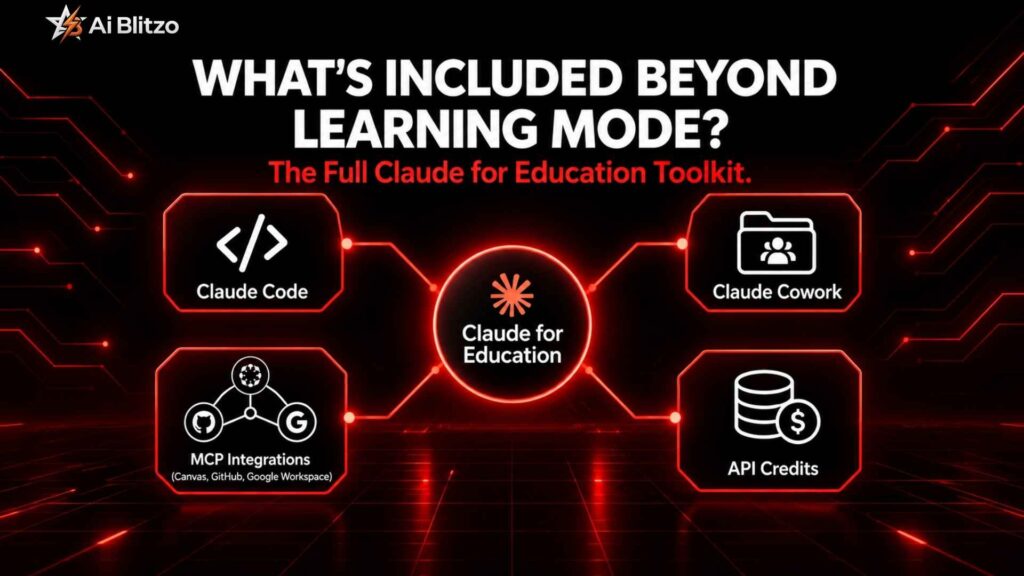
What’s Included Beyond Learning Mode?
Campus deployments of Claude for Education commonly bundle:
- Claude Code for programming coursework, letting CS and engineering students debug and write code directly in their environment
- Claude Cowork, a broader workspace for research and administrative tasks
- Integrations via the Model Context Protocol (MCP) with tools like Canvas, Google Workspace, GitHub, Panopto (for lecture transcripts), and Wiley (for peer-reviewed research content), so Claude can pull relevant context from the platforms you already use
- API credits for faculty and student researchers working on data-heavy or research-driven projects
Schools arrange access institution to institution. A university’s IT department or library applies for the program, not the individual student. If you’re not sure whether your school participates, ask there first. This program is what separates Claude for university students from a plain personal account.
Claude for Education vs. Claude for Teachers
Claude for Teachers is a separate, newer program. It offers free access for a year to verified K-12 educators in the US, and Anthropic built it with the Chan Zuckerberg Initiative’s Learning Commons. Claude for Education serves the university level; Claude for Teachers serves K-12 educators.
Read more: ChatGPT and Gumroad: How I Made $10,000 in One Month Easy Guide 2026
Real Ways Students Use Claude
Once you have access, the practical value shows up in a handful of recurring workflows.
Writing, Homework, and Research
Essay writing help. Claude helps with brainstorming structure, tightening arguments, and giving feedback on drafts, but be careful with “write my essay for me” requests. Beyond the academic integrity issue (more on that below), fully AI-generated work tends to read generically. It also won’t reflect your actual understanding of the material, which matters when you have to defend it in a seminar or exam.
Homework help and problem-solving. For STEM coursework especially, Claude walks through worked examples, explains a proof step by step, or helps you find where your own solution went wrong. Learning Mode handles this specifically: it nudges you toward the answer rather than delivering it outright.
Research assistant support. Claude helps you organize sources, summarize long readings, and structure a literature review. It isn’t built for citation generation from scratch, so verify any citation it produces against the original material rather than treating it as a final reference.
Coding, Documents, and Prompts
Coding help. For CS students, Claude Code explains error messages, debugs logic, and walks through concepts like recursion or data structures interactively. Pair it with the GitHub Student Developer Pack (where still available) to round out a low-cost dev toolkit.
Document and file analysis. Both Free and Pro tiers let you upload documents, problem sets, PDFs of readings, and lecture slides. That means you can ask Claude questions directly about material you already have, instead of retyping it.
Prompt engineering. A little prompt engineering goes a long way. Ask Claude to explain its reasoning step by step, rather than just handing over an answer, and you’ll get noticeably better results for coursework.
Faculty-side use. If you’re a TA or work with faculty, instructors also use Claude for lesson planning, drafting rubrics, and grading assistance. That’s useful context if you’re wondering how a professor might already use similar tools.
Academic Integrity: Where the Line Actually Is
Students most often want a straight answer here, and the honest one is: your institution’s policy decides this, not Claude itself. Anthropic doesn’t set your school’s academic integrity rules, and Claude has no way to know your specific assignment guidelines unless you tell it.
Most academic integrity policies land on the same rule of thumb. Using Claude to understand a concept, check your reasoning, or get feedback on your own draft is generally fine. Submitting its output as entirely your own work, without disclosure, crosses into plagiarism under most policies. Some professors explicitly welcome AI-assisted brainstorming and require you to cite AI use, similar to citing a source. Others prohibit it outright for certain assignments. Read your syllabus, and ask when it’s ambiguous.
On the detection side, no tool reliably proves a piece of writing came from AI with full accuracy. Both false positives and false negatives happen often with AI-detection software. That’s a reason to stay cautious about relying on Claude for pure output, rather than assuming you can use it undetected. The more relevant risk is simply violating your school’s stated policy. Responsible AI use comes down to disclosure and following your syllabus, not avoiding the tool entirely.
Read more: SEO vs GEO: Things You Need to Know Before Choosing a Route
Data Privacy and FERPA
If your school has a Claude for Education agreement, that arrangement typically builds in FERPA compliance, aligned to the Family Educational Rights and Privacy Act. That means institutional privacy terms govern student data, not general consumer terms. Anthropic states that some verified education accounts, including its Claude for Teachers program, turn off model training by default. If you use a personal Claude Free or Pro account instead of an institutional one, review Anthropic’s current privacy policy and settings directly, since consumer-account defaults can differ from institutional agreements.
Claude vs. ChatGPT for College Students
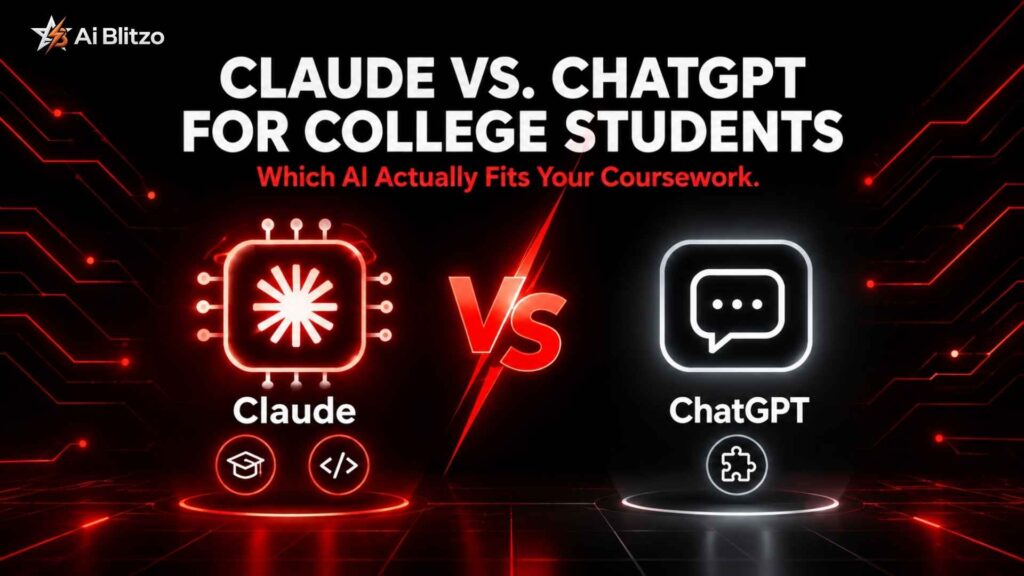
Both tools handle coursework well, but a few practical differences show up often in student use:
| Factor | Claude | ChatGPT |
|---|---|---|
| Tutoring philosophy | Learning Mode uses Socratic questioning | Study mode gives more direct guidance |
| Long documents and reasoning | Handles long, structured documents and multi-step reasoning well | Solid, but less consistently praised on very long context |
| Coding workflows | Claude Code is a dedicated programming tool | Relies on general chat plus plugins |
| Ecosystem | Narrower integrations, fewer promotions | Broader plugin coverage, more visible student promos |
Neither tool wins as a universal “better” choice. It often comes down to which one your school has an institutional deal with, since that changes your effective cost to zero. For a deeper side-by-side, check our Perplexity vs Claude and ChatGPT Plus vs Pro comparisons.
Limitations and Fact-Checking
Claude, like any LLM, can state incorrect information confidently. Every AI assistant shares this limitation; it isn’t unique to Claude. For coursework, that means you should:
- Double-check any factual claim, date, statistic, or citation before it goes into a paper
- Test generated code yourself before you treat it as production-ready
- Stay skeptical of anything that sounds suspiciously precise without a source you can verify independently
- Use Claude’s web search feature (available even on the Free tier) when you need current information, since the model’s training data has a cutoff point
Treat Claude as a study partner and a drafting tool, not an oracle.
A Note by Major
- Humanities and writing-heavy majors: lean on Claude for outlining, argument-testing, and revision feedback rather than first drafts you submit wholesale. Try: “Here’s my thesis and outline, poke holes in my argument before I write the full draft.”
- STEM majors: Learning Mode and step-by-step problem walkthroughs give you the highest-value use case. Try: “Walk me through this proof one step at a time, but don’t give me the next step until I respond.”
- CS and engineering: Claude Code plus MCP integrations with GitHub speed up debugging and project work. Try: “Explain why this function throws a null pointer error before you fix it.”
- Pre-professional (pre-med, pre-law, business): document analysis and case-study summarization save the most time, especially with dense reading loads. Try: “Summarize this 40-page case study into the five facts most relevant to the legal question I’m answering.”
Read more: Professional seo and content writing services to Grow Your Business Online
Frequently Asked Questions
Is Claude AI completely free for students?
Yes, everyone can use the free tier, which includes web search, memory, file creation, and code execution. Full Pro access at no cost usually comes through your school’s Claude for Education deal, not an individual student plan.
Does Claude offer a student discount like Spotify or Amazon Prime?
No. Claude Pro has no individual student discount. Any site claiming a special .edu price or coupon code isn’t an official Anthropic offer.
How do I know if my university has a Claude for Education plan?
Log into claude.ai with your university email and check whether your account upgrades automatically. If it doesn’t, ask your school’s IT department or library, since they manage the agreement.
What is Learning Mode and how is it different from just asking Claude for answers?
Learning Mode guides you to an answer through questions instead of giving it to you directly. It strengthens your understanding, rather than just finishing the assignment for you.
Will using Claude get me flagged for academic dishonesty?
Your school’s policy decides this. Using Claude to understand concepts or get feedback is usually fine; submitting AI-generated work as your own usually isn’t. Read your syllabus to be sure.
Is my data safe if I use Claude for schoolwork?
An institutional Claude for Education plan puts your data under FERPA-aligned privacy terms. A personal Free or Pro account falls under standard consumer terms instead.
Should I use Claude or ChatGPT as a student?
Both work well for coursework. Claude stands out for Learning Mode and Claude Code, while ChatGPT offers broader plugin support. Often the real deciding factor is which one your school already provides free.
Getting Started
Start with the Free plan at claude.ai if you want to try Claude. It now covers enough (web search, memory, file uploads, code execution) to test whether it fits your workflow before you consider paying. If you want the fuller Learning Mode and campus-integrated experience, check with your university’s IT department or library about whether a Claude for Education agreement already exists. That’s the fastest path to Claude for students who want zero-cost, full-featured access. If you’re weighing Claude against other AI tools, our Best AI Tools in 2026 roundup and Claude Code guide make good next reads, along with our GPT-6 Astra vs Fable 5.1 comparison if you’re weighing frontier models more broadly.
No secret student discount code exists. A real no-cost path does, and it just runs through your school instead of your wallet.
Still Have Questions?
If your school isn’t on the partner list yet, or you’re not sure which path fits your major, our team at aiblitzo is happy to help you figure it out. Contact us with your questions, or drop a comment below, and we’ll point you in the right direction.

3 Comments
Pingback: Voicemail Transcription: 3 Free AI Methods You must know
Pingback: Google Gemini Free vs Paid: 5 Real Differences That Matter
Pingback: Perplexity vs Claude: The Honest Truth on Which AI Wins