


Muse AI is Meta’s personal AI agent: software that books your travel, fills out web forms, and negotiates your bills while you do something else. The problem is the price of admission. To work, it needs access to your email, calendar, and payment methods, and Meta’s history on privacy gives plenty of people pause.
The answer isn’t to install it blindly or dismiss it outright. Learn what it does, what it costs, and which safeguards to enable before connecting an account. This guide walks through all three, plus the controversies the launch coverage glossed over, so your decision runs on facts instead of marketing.
What Is Muse AI?
Meta CEO Mark Zuckerberg announced Muse in a September 2026 launch as a personal AI agent. The concept is simple: instead of a chatbot that answers one question at a time, you get software that carries out long-running tasks on your behalf.
Muse vs ChatGPT: agent vs chatbot in one paragraph
ChatGPT is built around conversation. You ask, it answers, and the work stops when the chat ends. Muse is built around agentic AI: you hand it a goal, and it plans the steps, opens a browser, fills in forms, and keeps working after you close the app. One answers questions. The other runs errands.
The 30-second version
Muse runs as an iOS app, an Android app, a web app at muse.ai, and a chat inside WhatsApp. You describe what you want in plain language and connect the services it needs (email, calendar, shopping), and it gets to work. It passed 2.8 million downloads in its first 12 days and topped the App Store charts within weeks. Read Meta’s official announcement for the company’s own framing, then keep reading for the parts that Meta left out.
Should You Trust Muse With Your Email, Calendar, and Money?
This is the question that decides everything else. An agent that can’t be trusted with your inbox is a demo, not a tool. Here’s the honest breakdown: what Meta promises, what actually happened, and the checklist that puts you in control.
What Meta promises
Each user gets a dedicated virtual machine in Meta’s cloud, a setup the company calls a secure cloud computer. Your agent, its browser, and your credentials live there in isolation. A separate monitoring agent called Sentinel watches what Muse does and enforces app permissions, distinguishing between read access and write access.
Meta also promises three things that matter: a user approval workflow that pauses before sensitive actions like sending email or spending money, an audit trail showing everything the agent did, and advertising data separation, meaning your conversations aren’t fed to Meta’s ad systems. Payments go through a one-time-use card via Stripe’s Link wallet, so Muse never sees your real card number.
What actually happened: the Amazon block
On September 21, 2026, Amazon blocked Muse from its retail site. Shoppers using the agent saw a message saying continued access by an unauthorized AI agent violated Amazon’s Conditions of Use. Amazon said Meta never told it the agent would browse the store, that Muse didn’t identify itself as a bot, and that it appeared to capture and store customer credentials.
Shopify, meanwhile, welcomed the agent on its storefronts. The split tells you something important: the agent economy has no agreed rules yet, and some of the biggest stores on the internet want nothing to do with it. See Wikipedia’s overview of the launch controversies for the full timeline.
What actually happened: the human call-center workers
In September 2026, 404 Media reported that phone calls Meta presented as automated were, during beta testing, being completed by human call-center workers. Internal posts described a “human agent layer” where trained staff placed calls the AI couldn’t finish. Meta called it standard internal testing. Either way, it means some “AI” calls weren’t AI at all, and AI systems make confident mistakes, so verify important outputs before you treat them as done.
What the New York Times found
The New York Times has covered Muse twice in ways that matter. Its September reporting covered the launch itself. Later reporting found that Meta’s leadership pushed the agent to market despite internal awareness of safety shortcomings. Treat Meta’s security promises as claims to verify, not settled facts, and run through the checklist below before connecting anything.
Your privacy checklist before connecting anything
- Connect one low-risk app first. Start with something like a music or food delivery app, not your primary email.
- Set read access before write access. Let Muse see your calendar before you let it send invitations from it.
- Turn off training on your data. Meta uses your queries for model training by default. You can disable this in settings.
- Review the audit trail weekly. Make checking what the agent did a habit, the way you’d review a credit card statement.
- Learn how to test AI applications before trusting them with real work. Agents fail in ways chatbots don’t, and a testing mindset is the cheapest insurance you have.
Who Should Try Muse, and Who Should Wait
Try it now if you live in the US, you’re comfortable granting staged permissions, and you have repetitive digital errands (scheduling, bill calls, travel research) eating your week. The personal memory feature gets genuinely useful once it learns your preferences, and long-term goal planning is the standout use case nobody talks about enough.
If you’re outside the US, handle regulated client data, or were spooked by the Amazon block, you have no choice but to wait. Check out these AI automation quick wins for small businesses instead, and revisit Muse in six months when the dust settles.
What Can Muse Actually Do?
Forget the marketing reel. Here’s what the agent does on a normal Tuesday, grouped by how much you should trust it with each.
Everyday tasks. Sending emails, scheduling meetings, form filling on websites, and turning a saved Instagram recipe reel into a grocery list. Low stakes, easy to check, and the best place to start.
Money tasks. Bill negotiation (it calls and haggles), travel booking across Expedia and similar partners, and online checkout through Stripe. Higher stakes, so keep the approval workflow switched on. These are the business automation workflows that actually pay off when they work.
The standout trick: background tasks. This is the real break from chatbots. Give Muse a goal like “find me the cheapest flight to Chicago next Friday under $300 and book it,” close the app, and it keeps working. It returns when it needs a decision or finishes the job. That autonomous task execution is the whole product thesis.
How Muse Works Under the Hood
Muse ai Spark, and Muse Wonder coming next
Muse launched on Muse Spark, Meta’s in-house model built for agentic work. But the ground already shifted: on October 12, 2026, Meta announced the Muse Wonder models, its first models meant to compete at the frontier. Wonder Full scored near the top of independent benchmarks, but it’s available only through Meta’s $50-per-month Muse Code subscription. Standard Wonder will soon power some of the agent’s own functions, per New York Times reporting on the launch. That original Spark model now has an open-weight sibling you can download and run yourself, and our Muse Spark Open business guide explains what businesses can actually do with it.
Your own secure computer in Meta’s cloud
When you give Muse a task, the work happens inside your dedicated virtual machine, not on your phone. The agent gets its own browser you can watch, and the monitoring agent Sentinel enforces which connected apps it may touch and whether it can read or write. Think of it as hiring an assistant who works in a glass office: you can see everything, but the office still belongs to Meta.
This section explains how Muse learns about you and how you can limit that learning.
Muse builds personal memory from your conversations: your preferences, your contacts, and your routines. That’s what makes it useful, and it’s also the data privacy trade at the heart of the product. You can disable training on your queries in settings, revoke any app’s access at any time, and Meta says a version it cannot inspect at all arrives before the end of 2026. Until that version is released, assume that anything you tell Muse could be reviewed.
How Muse ai Makes Money (and Why It Matters to You)
There’s no advertising in Muse, and most users will never pay. So how does Meta profit? Zuckerberg said it plainly: by taking a small fee from transactions.
Every time Muse books your travel, orders your groceries, or checks you out through a partner store, Meta takes a cut. The free tier is the funnel; the transaction fees are the business. The one-time-use card system keeps your real payment details hidden, which is good security design.
The question nobody at Meta will answer directly: when two stores sell the same product, does Muse recommend the one with the better price or the one with the better commission? Until there’s transparency on that, treat shopping recommendations as suggestions, not verdicts, and price-check anything over $50 yourself.
Muse vs ChatGPT vs Gemini vs Claude (Muse ai)
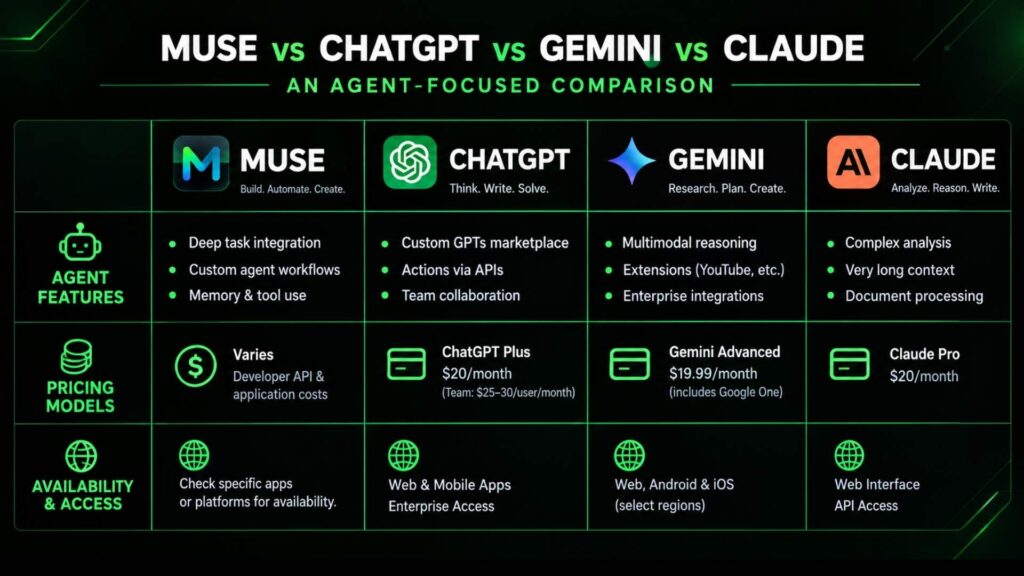
The honest version: these aren’t direct competitors so much as different species. ChatGPT, Gemini, and Claude are assistants that answer. Muse is an agent that acts. For writing, analysis, and coding help, the established chatbots remain excellent, and our guide to comparing AI assistants walks through how to pick between them.
Muse’s edge is doing things across websites and services: the bookings, the forms, and the purchases. Its weakness is everything else: it’s brand new, US-only, and unproven at the careful reasoning tasks where Claude and ChatGPT have years of refinement. Beyond the big four, alternatives like Kimi cover some of the same ground for specific needs.
If your work is mostly “answer this,” stick with what you know. If it’s mostly “handle this,” Muse is worth a trial.
Pricing: Is the Free Tier Enough?
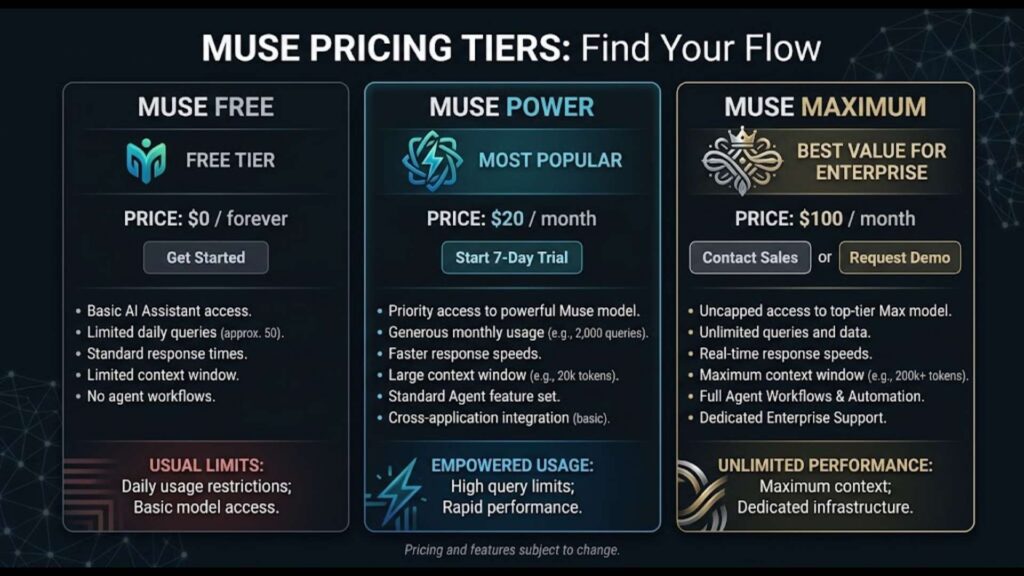
The free tier covers everyday use: emails, scheduling, research, and the occasional booking. Meta believes most people will never leave it. The Power plan at $20 per month and the Maximum plan at $100 per month buy higher usage limits for people who delegate constantly.
Two practical notes. First, Muse requires a payment card to get started even on the free tier, which surprises people. Second, the app includes a usage meter showing how much of your allowance remains, and warns you before free usage runs out. Start free, watch the meter for a month, and only upgrade if you’re actually hitting the ceiling.
How to Set Up Muse Safely (Muse ai)
Step 1: connect one low-risk app first. Pick something with no financial access, like Spotify or a food delivery app. Learn how the agent behaves before it touches anything sensitive.
Step 2: set read vs. write permissions. In the connected apps screen, grant read access widely and write access sparingly. Muse can check your calendar freely; it should ask before sending invitations from it.
Step 3: turn off training on your data. Go to settings and disable the option that lets Meta use your queries for model training. Then review what’s connected once a month, the way you’d review app permissions on your phone.
Once you’re comfortable, you can pair Muse with a broader automation setup. Our guide to picking the right workflow automation tool covers the platforms that handle the jobs Muse shouldn’t.
Limitations You Should Know (Muse ai)
US-only rollout. Muse is available only in the United States for users 18 and older. No international dates announced.
Not on your face yet: Meta’s AI glasses. If you came here searching for Meta’s AI glasses and how Muse fits in, Meta has said the agent will work with its smart glasses through a wake word, but that support isn’t live yet. Glasses remain a promised platform, not a current one.
It’s five weeks old. Expect rough edges, occasional failures, and features that change monthly. Early adopters get the upside and the bugs.
Muso AI, “Haze Muse,” “Millionaire Muses”: Clearing Up the Name Confusion
None of them are Meta’s Muse. The similar names are coincidences, and installing the wrong app is the most common mistake confused searchers make.
Muso.ai is a music credits platform for songwriters, producers, and engineers: a database of 50M+ tracks and 8M+ artists where music professionals claim profiles and fix their discography credits. It’s been around since 2020, years before Meta’s agent launched, and has nothing to do with AI assistants.
Searches for “haze muse ai” or “millionaire muses ai” point to other products borrowing the name’s momentum. Treat any “muse” app not published by Meta Platforms with skepticism. Check the developer name in the app store before installing. Handing email or calendar access to a lookalike on name recognition alone is a data privacy disaster waiting to happen.
The genuine article is Meta’s personal AI agent: the iOS app, Android app, and web app at muse.ai, with a free tier covering everyday use. To use it, install the app, connect one service, and describe a task in plain words. “Find the cheapest flight to Chicago next Friday” works better than a perfect prompt.
Frequently Asked Questions
Q: I searched “Meta AI Muse.” Is that the same as Meta AI?
No. “Meta AI Muse” and “Muse Meta” are just scrambled search phrasings for the same product: Meta’s personal agent, Muse. Meta AI is the older assistant built into Facebook, Instagram, and WhatsApp. Different product.
Q: How do I remove Meta AI from Facebook?
That’s the older Meta AI assistant, not Muse. Removing it is a separate process in your Facebook settings. Muse is a standalone app and agent; the two don’t share settings.
Q: Do I need a subscription to use Muse Wonder?
Wonder Full requires a Muse Code subscription (from $50/month). The standard Muse agent app runs on its own models under the free, $20, and $100 tiers.
Q: Who developed Muse AI?
Meta Platforms. It was built by Meta Super intelligence Labs under chief AI officer Alexandra Wang.
Q: When was Muse released?
September 8, 2026, in the United States for users 18 and older.
Q: Is the Muse app free?
Yes, the free tier covers everyday use. The Power plan ($20/month) and Maximum plan ($100/month) raise the usage limits.
Conclusion
You now know what Muse costs in money and in data, which safeguards to enable, and where the real risks sit. The next move is small: install it, connect one low-risk app, and hand it a single errand. Let it earn the deeper access.
For more practical, no-hype guides on putting AI to work, browse the latest walkthroughs on Ai Blitzo.



[…] Muse AI Is Overhyped: 3 Reasons to Wait […]
[…] from Hugging Face under the Muse Model License. We covered Meta’s assistant strategy in our Muse AI breakdown, and Spark Open is the engine room behind that push: the model you can run yourself instead of […]
[…] on how frontier models are built and why these architecture choices affect your bill, see our Muse AI explained guide, which walks through the key ideas in plain […]