

By Zarirah Asif | OpenAI Decisions API Updated October 26, 2026
The OpenAI Decisions API is now generally available, and it changes how you pay for routine AI judgments. OpenAI released it on October 22, 2026, after a public beta that started October 6. It returns short, typed answers instead of full text. You pay only for input tokens, never for output tokens. This article explains the real pricing, the limits, and when you should skip it.
Most apps waste money on AI calls that return one value. A support tool asks which department owns a ticket. The model writes a full JSON object. Your code parses it and keeps one field. You paid for every output token in that JSON. You also paid for parsing code that breaks when the format shifts. At high volume, that waste adds up fast. Small teams feel it first, because they lack the budget to absorb sloppy calls.
First, route every yes-or-no, category, or score question through the OpenAI Decisions API. Then, keep Structured Outputs for jobs that need a full object back. Finally, check your cache setup before you trust the headline price. This split cuts output-token costs to zero on narrow questions. It also removes a whole class of parsing bugs.
This article explains what the OpenAI Decisions API does, what it costs in practice, and where it breaks. You will see the three question types, the cache pricing trap, and a direct comparison with Structured Outputs. Then you will get a clear rule for when to use it and when to skip it.
Key Takeaways
- The OpenAI Decisions API went generally available on October 22, 2026, after a public beta that started October 6.
- It runs only on GPT-6 Luna, through the endpoint POST /v1/decisions, with up to 400 questions per request.
- You pay $0.10 per million uncached input tokens and $0.01 per million cached input tokens, with zero output-token charges.
- Cache writes cost extra, up to $0.25 per million tokens for a 12-hour cache, so caching can raise your bill when your input changes on every call.
- Use Decisions for narrow, bounded answers, and use Structured Outputs when you need a full object back.
What Is the OpenAI Decisions API?
The OpenAI Decisions API answers questions that have a fixed shape. You send an input, such as a support ticket, a product photo, or a JSON record, plus a list of questions. Each question states its type and its allowed answers. The API returns a typed result for each question, never prose.
Three question types cover most routine judgments. First, a predicate returns a probability between 0 and 1 that a condition holds. For example, it can judge whether a product photo shows visible damage. Then, a choice picks one value from a list you define, and it returns a confidence score plus a probability for every option. For example, it can route a complaint to billing, shipping, technical, or other. Finally, a score grades an input against an ordered rubric of 2 to 10 levels, and it returns a probability-weighted average. For example, it can handle severity triage by grading bug severity from none to major.
OpenAI announced general availability on October 22, 2026, listing Box, Datadog, Ramp, Sierra, and Speak among the companies using the API. Treat that list as vendor-reported, not as independent proof.
Pricing: The Real Math
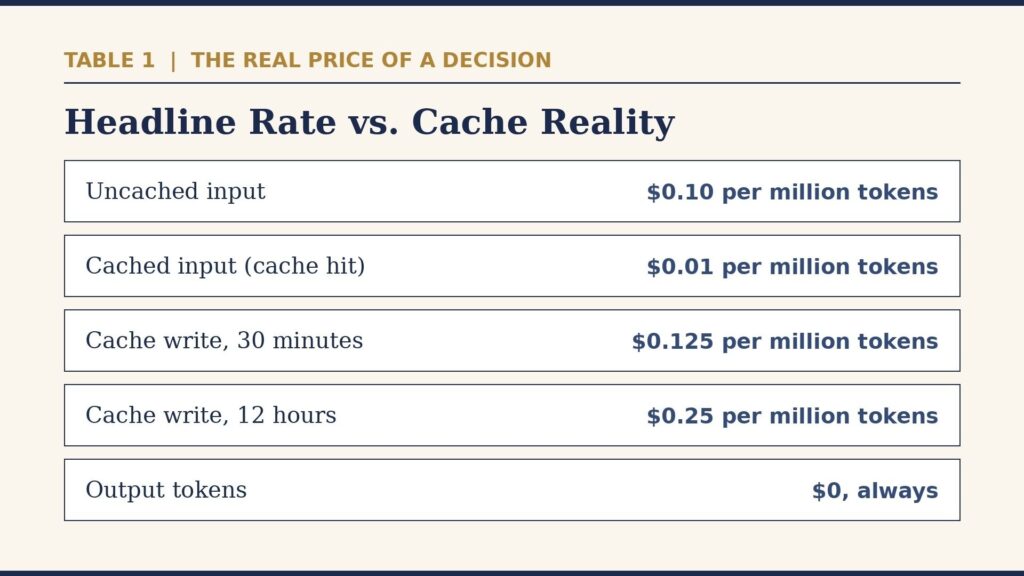
The headline price is simple: $0.10 per million uncached input tokens for GPT-6 Luna through the API, $0.01 per million cached input tokens, and nothing for output tokens. So a million classification calls at 500 input tokens each cost $50 at the headline rate. That math is easy to quote, and it is also incomplete.
Still, caching changes the bill in both directions. For example, a cache hit costs one tenth of a cold call, but a cache write costs more than a cold call. Per OpenAI pricing data compiled after general availability, a 30-minute cache write costs $0.125 per million tokens. A 12-hour cache write costs $0.25 per million tokens, or 2.5 times the base rate. You pay that surcharge before you ever see a cache hit.
The cache also has a floor that most short inputs never reach: the reusable prefix must contain at least 1,024 tokens before it qualifies. A short support ticket body will not hit that floor. So a support-routing workload with a different ticket on every call gets no cache hits at all, yet it still pays the write surcharge when caching stays on. For that workload, the honest budget is the flat $0.10 rate, not the $0.01 cached rate.
Run your own numbers before you commit. First, count your monthly calls and your average input tokens per call. Then, multiply by $0.10 per million tokens for the cold-call case. Next, check whether your shared input stays stable across calls and clears 1,024 tokens. If it does, model the cached case separately. If it does not, turn caching off and budget the flat rate. Finally, add regional premiums and long-context multipliers, since OpenAI lists those as separate charges.
What Changed in the OpenAI Decisions API at General Availability
General availability brought more than a status change. The per-request question cap doubled, from 200 in beta to 400. Native JSON input arrived, so you can pass structured app data directly. Questions can now carry their own image parts, so one request can compare several candidate images against one shared reference. Prompt caching arrived for the first time, keyed on the shared input. Search Engine Watch confirmed the same GA details.
Voice apps gained a native GPT-Live integration, so a session can call the API as the user speaks. Inference residency now covers the US and EU, and Zero Data Retention and HIPAA use are open to eligible customers.
One reporting quirk deserves attention. Usage reporting counts requests, not questions. A 400-question request shows up as one request on your dashboard, even though you pay for the tokens of all 400 questions. So dashboard counts understate your real workload. Track token spend directly when you forecast costs.
OpenAI Decisions API vs Structured Outputs
Most teams already know Structured Outputs on the Responses API. The real question is when Decisions beats it. The answer turns on the shape of the answer you need.
Structured Outputs returns any JSON object that matches your schema, works with any Responses-compatible model, and charges for output tokens. Function calling lets a model request a tool call with arguments. Both tools suit jobs where the model must produce something: extracted fields, a written explanation, or a structured document.
Decisions suits the opposite job. It returns a typed probability, choice, or score, and nothing else, runs on GPT-6 Luna only, and charges nothing for output tokens. OpenAI claims it runs up to 10 times faster than the same model through the Responses API. Treat that speed claim as vendor-reported, since no independent benchmark has confirmed it yet.
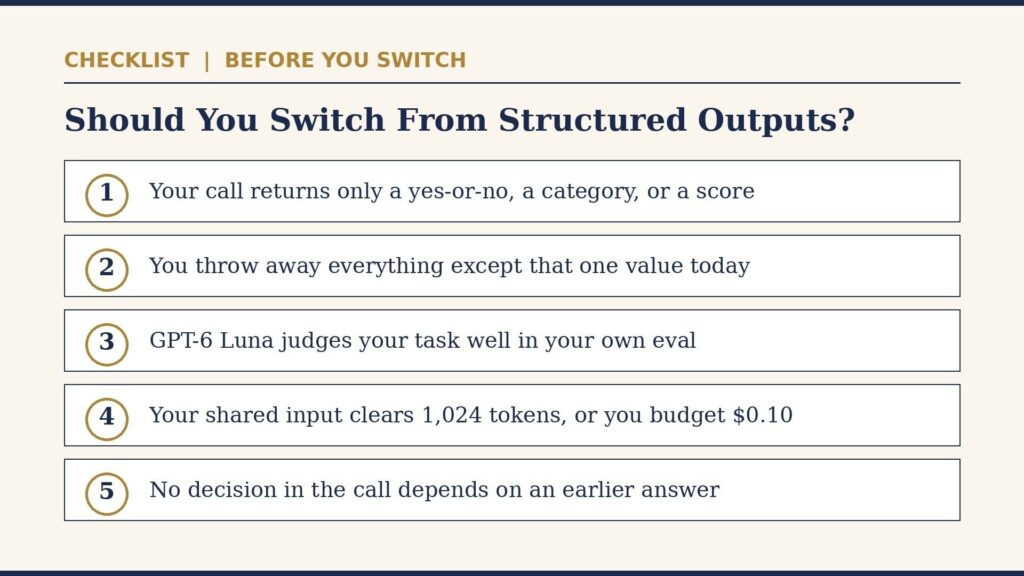
Here is the decision rule. If your call exists only to get a yes-or-no, a category, or a severity level back, and you throw away everything else, use Decisions. A call that needs three extracted fields and a two-sentence summary belongs on Structured Outputs. And when your “structured output” is really just one enum field wrapped in a JSON schema, you have been paying for generated output tokens to produce something Decisions gives you for free. Switch that call first, because it is the easiest win.
When the OpenAI Decisions API Pays Off
Content moderation gates fit first. A moderation call asks whether a post breaks a rule, and it needs a yes-or-no answer with a confidence score. Support ticket routing fits next, since a routing call needs one category back. Image quality checks fit too, since a quality call needs a probability back.
Batching multiplies the win. The 400-question cap lets you pack many checks into one call against a shared reference. For example, grade 400 product photos against one reference image in a single request. You still pay for all 400 questions’ tokens, but you cut request overhead and simplify your code path.
Volume decides whether the switch is worth the work. A team running a few hundred classification calls a day will save little cash, though it will still save parsing bugs. A team running millions of calls a month will see real money move. Measure your current classification volume before you rewrite anything. If narrow questions already dominate your AI spend, Decisions should sit near the top of your queue.
Teams building automation should treat this as one more tool in the same discipline we cover in our guide to AI automation workflows that pay off. The win comes from removing a manual step or a fragile parse, not from the model itself. testing AI applications before trusting them in production matters here too, since a routing decision can send a customer to the wrong team. So test the questions, the thresholds, and the fallback path before you ship.
5 Limits That Bite
First, one model only. GPT-6 Luna is the only model Decisions runs on. You cannot trade accuracy for cost by stepping up to a bigger model, the way you can on Responses. If Luna judges your task poorly, you have no model dial to turn, so you must fix the question, add examples, or move the workload elsewhere.
Then, no dependent questions in one call. If you need to check for damage first and only then classify a repair category, that takes two sequential requests. A 400-question call evaluates shared evidence in parallel, not a chain of dependent steps. So multi-step triage needs orchestration code on your side.
Also, no file ID inputs. Images go in as inline base64 data URLs or public HTTP or HTTPS URLs. If your images live behind an API that OpenAI servers cannot reach, you must base64-encode them yourself first, which adds payload size and preprocessing work.
Finally, regional coverage stops at the US and EEA plus Switzerland. If your compliance posture requires a specific region outside those two, it does not cover you yet. So check your data-residency rules before you route regulated data through it.
Still, single-model lock-in is a business risk, not just a technical limit. Your prompts, thresholds, and evals all tune to Luna behavior, so if OpenAI changes Luna pricing or behavior, your whole classification layer moves with it. Teams that need model choice can study open-weight models you can host as a hedge, though that path adds hosting work.
OpenAI Decisions API: Honest Limits
This story has real limits. First, no independent accuracy comparison exists yet. Watch for eval firms to publish comparisons against hand-rolled Structured Outputs classifiers now that pricing and the 400-question limit are locked in. Until then, every speed and cost claim comes from OpenAI itself, so run your own eval before you trust the headline numbers.
Also, the cache pricing story still has gaps. Regional premiums and long-context multipliers apply on top of the listed rates, and OpenAI publishes no worked example that combines them. Your invoice may land above the simple math in this article, so run a small pilot and read the first invoice before you scale.
Fourth, search interest data for this keyword is unmeasured in this run, as the package block states plainly. That gap says nothing about the product itself. It only means this article makes no trending claim.
OpenAI Decisions API: FAQs
Q: What is the OpenAI Decisions API?
The OpenAI Decisions API is a dedicated endpoint that returns short, typed answers instead of full text. You send an input plus a list of questions, and it returns a probability, a choice, or a score for each question. It runs on GPT-6 Luna through POST /v1/decisions.
Q: How much does the OpenAI Decisions API cost?
The OpenAI Decisions API costs $0.10 per million uncached input tokens and $0.01 per million cached input tokens, with no charge for output tokens. Cache writes cost extra: $0.125 per million tokens for a 30-minute cache and $0.25 per million tokens for a 12-hour cache. Regional premiums and long-context multipliers can add more.
Q: What question types does it support?
It supports three question types: a predicate, which returns a probability between 0 and 1 that a condition holds; a choice, which picks one value from a list you define and returns a confidence score; and a score, which grades input against an ordered rubric of 2 to 10 levels and returns a probability-weighted average.
Q: Is it faster than the Responses API?
OpenAI claims it runs up to 10 times faster than GPT-6 Luna through the Responses API for the same decision task. Treat that claim as vendor-reported, because no independent benchmark has confirmed it yet. Run your own latency test on your own workload before you rely on the number.
Q: When should I skip it?
Skip it when you need a generated object with your own schema, a written explanation, or several extracted fields. Use Structured Outputs for those jobs. Also skip it when you need a model other than GPT-6 Luna, or when your decision depends on an earlier answer in the same call.
Q: Does it support other models?
No, it supports GPT-6 Luna only. You cannot switch to a bigger or smaller model for a given call. If Luna fits your task poorly, you must fix the question or move the workload to another API.
Q: Can it handle dependent questions?
No, it cannot handle dependent questions in a single call. Questions in one request evaluate shared evidence in parallel. If one decision depends on an earlier answer, you must make sequential requests and orchestrate the chain yourself.
The Bottom Line
The OpenAI Decisions API is a sharp tool for a narrow job. It kills output-token costs on classification, routing, and scoring calls, and it removes JSON parsing bugs from those calls. It also locks you to one model, hides a cache-write surcharge behind a friendly headline rate, and counts requests in a way that understates your real workload. So use it where the answer shape fits, budget the flat $0.10 rate unless your cache case is airtight, and test accuracy on your own data before you scale. That discipline turns a cheap API into real savings, instead of a surprise invoice.
Know AI news, SEO, automation, or SaaS tools well enough to explain them this clearly? Write for Ai Blitzo: real editors, fast replies, and your work in front of people who actually use AI tools.
About the Author
Zarirah Asif is an SEO writer who writes about industry trends, digital marketing, technology, and content strategies for brands. She specializes in creating engaging, informative, and SEO-friendly articles that deliver value to readers. Her goal is to help brands improve their online visibility through quality content and effective SEO practices. Connect with her on LinkedIn to learn more about her work and professional journey.

