
Quick answer: To learn how to create an AI agent, pick one narrow job, choose a no-code platform or a framework, connect a current model such as GPT-6.2 Sol, give the agent two or three tools, add memory, set clear guardrails, and test it on real cases. Most beginners can ship a first agent in a day for under $50 a month.
Learning how to create an AI agent is simpler than most guides make it sound. An agent takes a goal, plans steps, uses tools, and checks its own work until the job is done. However, most first builds fail for a boring reason: the job is too broad. Therefore this guide keeps every step narrow.
What Is an Artificial Intelligence Agent?
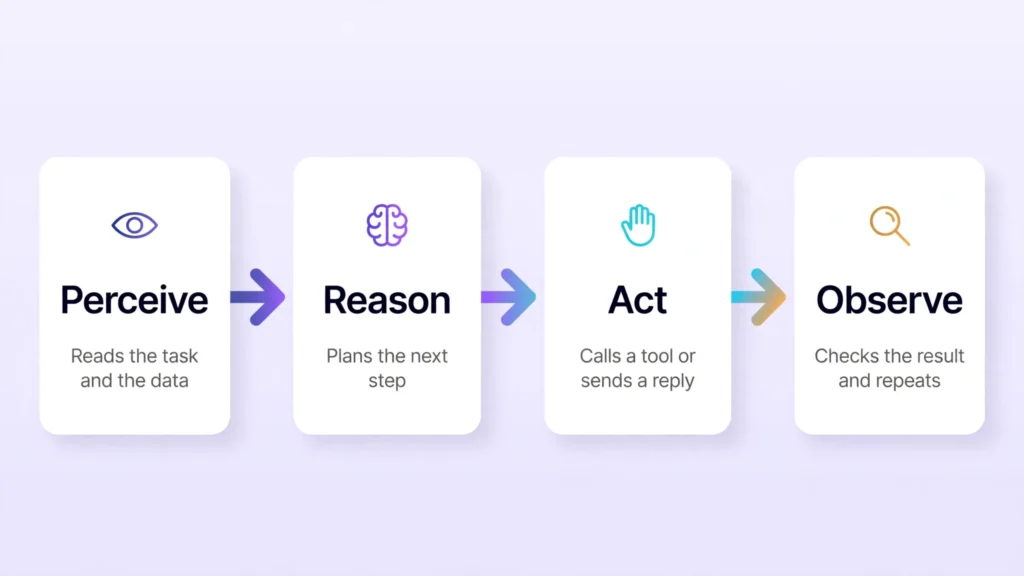
An artificial intelligence agent is software that works toward a goal on its own. It reads a task, decides the next step, takes an action with a tool, and checks the result until the job is done or a person steps in. A chatbot only answers when you write to it. An agent, on the other hand, acts.
The loop has four parts: perceive, reason, act, and observe. It perceives the task, reasons about the next step, acts with a tool, and observes the result. That loop is the heart of how to create an AI agent, and every step below builds on it.
Do You Need an Agent or Just a Workflow?
You need an agent only when the path to the answer changes each time. If the steps are always the same, a fixed workflow is faster, cheaper, and easier to trust. So ask this question first when you learn how to create an AI agent.
Try the surprise test: if you can list every step in advance, build a workflow, but if the work surprises you, an agent earns its keep. Our guide to how small businesses use AI shows the same rule in practice.
| Task type | Best choice | Why |
|---|---|---|
| Same steps every time | Fixed workflow | Predictable, cheap, and easy to test |
| Judgment calls vary each time | AI agent | The agent picks the next step itself |
| Needs live data plus decisions | AI agent | Tools plus reasoning beat a static script |
How to Create an AI Agent in 7 Steps
The seven steps below work for no-code builders and developers alike. Each step answers one decision.
Step 1: Define One Narrow Job
Write the job in a single sentence and define what a correct result looks like. A good first job is “answer refund questions under $25 and escalate the rest.” The narrow version tells the agent exactly when to act and when to stop. If you cannot write the job in one sentence, narrow it until you can. That is the first rule of how to create an AI agent well.
Step 2: Choose Your Build Path
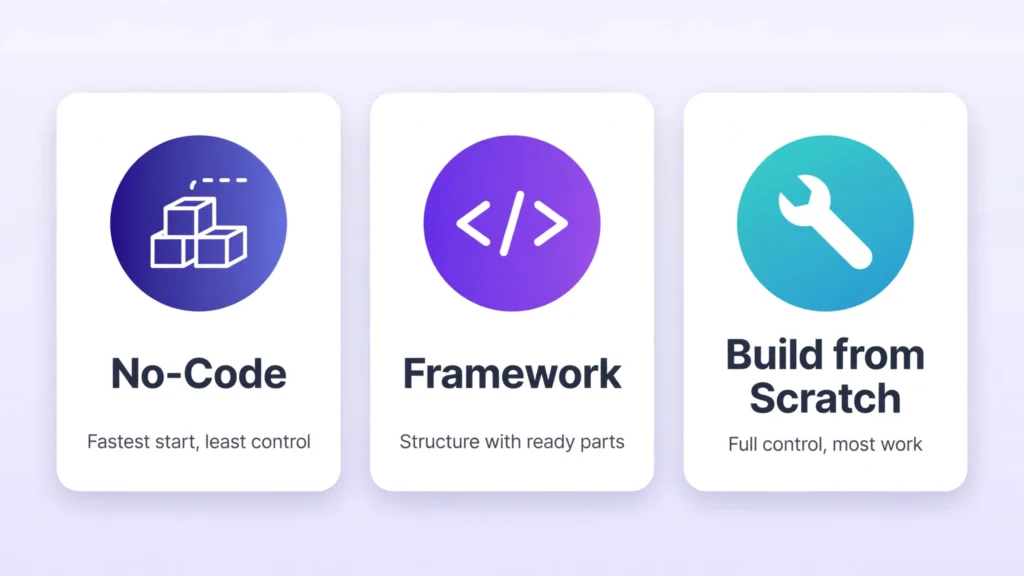
You have three paths. No-code platforms are fastest: you describe the job in plain English and connect your apps. Frameworks such as LangGraph and CrewAI give developers structure. Building from scratch gives you full control, but it takes the most work. Beginners should start no-code.
Step 3: Pick a Model That Fits the Job
Pick a model that handles tool use and multi-step instructions well. OpenAI lists GPT-6.2 Sol at $2.00 per 1M input tokens and $10.00 per 1M output tokens, and GPT-6.2 Astra at $8.00 and $40.00 for harder reasoning. GPT-6.2 Sol is the sensible default for a first agent. OpenAI has scheduled GPT-5 for deprecation on December 11, 2026, so start new builds on GPT-6.2 Sol or GPT-5.6 Sol.
Step 4: Give the Agent Tools
A tool is anything the agent can do beyond writing text, such as searching the web or sending an email. Start with one or two tools, because each extra tool adds a new way for the agent to go wrong. Describe each tool in plain words so the model knows when to use it. People who learn how to create an AI agent often overbuild here, so keep the tool list short.
Step 5: Add Memory and Knowledge
Short-term memory is the running conversation, while long-term memory covers your own documents, such as a refund policy. Connect a file search or a knowledge base so the agent retrieves facts instead of guessing. Add memory only when it improves results, because too much stored context can confuse the model.
Step 6: Write Instructions and Guardrails
Write the instructions as a short role card: what it may do, what it must never do, and when to hand off to a person. Then add guardrails: a maximum number of steps per run, a daily spending cap, and approval for risky actions such as refunds or deletions. Guardrails are the difference between a helpful agent and an expensive mistake. Clear guardrails make how to create an AI agent safe instead of risky.
Step 7: Test, Launch, and Watch the Cost
Test the agent on 20 real cases before it touches customers. Keep a person reviewing every action at first, and log each run. Set a cost alert on day one, because a looping agent can burn through tokens fast. Launch small, watch the logs daily, and expand only after the numbers stay stable. That discipline is how to create an AI agent that lasts.
How to Create an AI Agent Without Code
You can build a working agent without writing code by using Zapier Agents or n8n. You describe the job in plain English, connect your apps, and the platform runs the loop for you. This is the fastest way to learn how to make an ai agent, because you can test an idea in an afternoon. It is the easiest way to learn how to create an AI agent.
With Zapier Agents, you start on the free tier, which includes 400 activities a month. You describe the agent, connect Gmail and Slack, and the agent drafts replies for your team channel. If you outgrow the free tier, Agents Pro costs $400 a year, shown as $33.33 a month, for 1,500 activities a month. Zapier connects to more than 9,000 apps.
With n8n, you build on a visual canvas with an AI Agent node at the center. The Community Edition is free when you host it yourself, while the hosted Starter plan costs 20 euros a month on annual billing for 1,600 executions a month. The Pro plan costs 50 euros a month and covers up to 9,600 executions. Our guide to agentic AI coding tools covers the frameworks for the next step.
AI Agent Platforms Compared
The best platform fits your team, not the longest feature list. The table below compares the main options with prices checked live on November 23, 2026.
| Platform | Best for | Starting price | Free tier |
|---|---|---|---|
| Zapier Agents | Non-coders, many SaaS apps | Pro $400 a year ($33.33 a month) | 400 activities a month free |
| n8n | Visual builders, self-hosting | Starter 20 euros a month, annual billing | Community Edition free, self-hosted |
| Microsoft Copilot Studio | Microsoft 365 teams | $200 a month per tenant, 25,000 credits | Trial through a Microsoft 365 plan |
| OpenAI Agents SDK | Developers, Python projects | Pay per token, GPT-6.2 Sol $2 per 1M input | Open source, free to use |
We checked these prices on November 23, 2026. Confirm the model rates on the OpenAI API pricing page, the no-code rates on the n8n pricing page, and the Zapier plans on the Zapier pricing page. Microsoft lists Copilot Studio at $200 a month per tenant for a pack of 25,000 Copilot Credits, with pay-as-you-go at about $0.01 per credit. You can also hire ai agent development services, but test the job yourself first so you can judge their work.
How to Create an AI Agent for Under $50 a Month
A small agent can run for about $37 a month: model fees of about $13.50 plus the n8n Starter plan at about 20 euros. The example uses a support triage agent handling 50 requests a day.
| Item | Monthly cost |
|---|---|
| Model fees, GPT-6.2 Sol, 1,500 runs | About $13.50 |
| n8n Starter, 1,600 executions included | 20 euros, about $23 |
| Total | About $37 a month |
Check these assumptions against your own workload. Each request uses about 2,000 input tokens and 500 output tokens. At GPT-6.2 Sol rates, 1,500 requests a month cost about $6.00 in input and about $7.50 in output. If your agent uses more tokens per run, the model bill grows first, so watch the per-run average in your logs.
How We Tested
We checked every price live on November 23, 2026, on the official pages from OpenAI, n8n, and Zapier, and we cross-checked Copilot Studio pricing against Microsoft’s published rates. We also read the top 10 Google results for how to create an AI agent. Our verdict: start no-code, prove the job works, then move to code.
Real-World Application and Pitfalls
Picture a small online store that gets 50 support emails a day. The owner builds a triage agent: read each email, look up the order, draft replies, and escalate refunds over $25. The agent runs on n8n, uses GPT-6.2 Sol, and costs about $37 a month. It works because the job is narrow and a person still reviews the escalations. That matches our guide to AI and business.
Pitfalls are just as real, so plan for them. Cap every run at 10 steps, because an agent that cannot finish a task will retry forever. Hallucinated facts are next: an agent that guesses an order number will send a confident wrong answer, so make it look up every fact in a tool. Cost spikes follow the same pattern, so set a daily cap and a cost alert. Finally, protect privacy by giving the agent the smallest access it needs. Coding agents face the same risks at a larger scale, and our Flint coding model guide shows what to watch when an agent writes code. See our future of AI predictions for more.
Frequently Asked Questions
How to create an AI agent?
Pick one narrow job, choose a no-code platform or a framework, connect a current model such as GPT-6.2 Sol, give the agent two or three tools, add memory, set guardrails, and test it on 20 real cases. Most beginners finish the seven steps in this guide in a day.
How to make an AI agent without coding?
Use Zapier Agents or n8n. Describe the job in plain English, connect your apps, and let the platform run the loop. Zapier Agents starts free with 400 activities a month, while n8n offers a free self-hosted Community Edition.
How to build an AI agent with Python?
Install the OpenAI Agents SDK with pip install openai-agents, or use LangGraph for stateful multi-step work. Write a short loop: send the goal and tools to the model, run the tool it picks, feed the result back, and repeat.
How to build your own AI agent for free?
You can build the agent itself for free with n8n Community Edition or the open source OpenAI Agents SDK. Model calls still cost money, but GPT-6.2 Sol costs $2.00 per 1M input tokens, so a small test costs less than a dollar.
A practical guide to building agents: what should I build first?
Build a support triage agent or a research summary agent, since both have one clear job and low risk. Avoid refunds, payments, and deletions for your first build.
Final Takeaway
Learning how to create an AI agent comes down to seven decisions: one narrow job, one build path, one current model, two or three tools, the right memory, clear guardrails, and honest testing. Start no-code, prove the job on real cases, and watch the cost. Your first agent can be live this week.