


By Zarirah Asif | AI Business Solutions Updated Nov 22, 2026
AI business solutions that work for small teams do one repeated job well. They cost less than $25 per person a month and also run inside tools the team already uses. The U.S. Chamber of Commerce found that 58% of small businesses used generative AI in 2025. That is up from 23% in 2023. Most of them bought ready-made tools instead of building their own. This guide names the tools, the prices, and the order to adopt them in.
The problem is choice. Every vendor sells an assistant, an agent, or a platform, and prices also hide behind seat minimums, annual billing, and add-ons. A five-person team can sign up for six tools in one afternoon and still lose time copying data. One wrong pick can waste the whole software budget, because small teams cannot spread the risk across departments.
First, start with one shared assistant for the whole team. Add one specialist for the job that eats the most hours. Automate one handoff between tools you already pay for. Give each step 30 days and one owner. If a tool does not save a named person two hours a week by day 30, cancel it.
Prices were checked on vendor pages on November 22, 2026. It also covers the tools to skip and a 30-day rollout plan. Prices are list prices in US dollars, before tax. They change often, so check the vendor page before you buy.
Key Takeaways (AI business solutions)
- A shared AI assistant costs $20 per person a month on annual billing at OpenAI and Anthropic, with a two-seat minimum.
- Gemini comes inside Google Workspace from $7 per user a month, and Copilot Business costs $21 on top of a Microsoft 365 plan.
- Intercom Fin charges $0.99 per resolved conversation, so support AI scales with answers, not seats.
- HubSpot’s free CRM covers two users. Starter lists at $20 per seat a month, so plan around the $890 Professional jump.
- Zapier’s free plan covers 100 tasks a month. Professional also starts at $19.99 a month on annual billing.
Quick Picks by Job
| Job | Pick | Price |
|---|---|---|
| General assistant | ChatGPT Business | $20 per user a month, annual |
| General assistant | Claude Team | $20 per user a month, annual |
| Google apps | Gemini in Workspace | From $7 per user a month |
| Microsoft apps | Copilot Business | $21 per user a month, annual |
| Customer support | Intercom Fin | $0.99 per resolved conversation |
| CRM and sales | HubSpot | Free for 2 users; Starter $20 per seat a month |
| Team knowledge | Notion Business | $20 per member a month, annual |
| Automation | Zapier | Free 100 tasks a month; Pro $19.99 a month |
AI Business Solutions Start With One Assistant, Not Ten Tools
First, buy one shared assistant before anything else. ChatGPT Business and Claude Team both list a standard seat at $20 per user a month on annual billing, or $25 month to month. Both plans still need at least two seats. OpenAI renamed its Team plan to Business in August 2025. Both plans also keep business data out of model training by default. Both add an admin console. Check the current seat prices on OpenAI’s business pricing page before you commit.
Pick ChatGPT Business, for example, when the team works with spreadsheets, images, and custom GPTs. Pick Claude Team for long documents and code review, since Claude handles long context well. If the team already lives in Google Docs and Gmail, Gemini is the cheaper path, so start there. It sits inside Workspace Business Starter at $7 per user a month. The fuller version in Docs and Meet comes with Business Standard at $14. Microsoft shops can also get Copilot Business at $21 per user a month on an annual commitment. An $18 first-year price runs through December 31, 2026. Pay for the assistant that lives where the work already happens. For the wider picture, see our pillar guide on AI and business.
One warning: a personal Plus or Pro account is not a team plan, since it has no admin console, no central billing, and no company-wide data controls.
Customer Support: Pay Per Answer, Not Per Seat
Support is the easiest place to prove value, because every resolved conversation has a visible cost. Intercom Fin, the AI agent inside Intercom, charges $0.99 per outcome. An outcome covers a resolved conversation, a procedure handoff, or a routing to self-service. Seat plans sit on top, from $29 per seat a month. Teams on another helpdesk can add Fin alone, with a 50-outcome monthly minimum. HubSpot also takes a similar path, with a Customer Agent that resolves conversations for about $0.50 each in HubSpot Credits.
Start with the 20 questions customers ask most. Load those answers into the help center first. An AI agent can only answer from the knowledge you give it. A thin help center still means wrong answers delivered with confidence. Keep refunds, complaints, and legal threats on a human path from day one. If resolution rates stall below half of conversations, fix the help articles first.
A team that answers fewer than 200 support messages a month can skip the paid agent. A shared assistant plus a good help center also covers it. Our guide to AI and automation for small business covers the same first-win logic.
Sales: Let AI Do the Follow-Up
Sales is where small teams lose the most time to admin. AI in sales works best on three jobs: drafting follow-up emails, scoring leads, and keeping the CRM current. HubSpot’s free CRM covers two users. Its Breeze AI assistant drafts outreach and fills in company details. The Starter plan lists at $20 per seat a month. It also adds 500 HubSpot Credits a month for AI features.
Set one rule before you switch anything on. Every AI-drafted message still goes out under a human name, after a human reads it. An AI that invents a discount costs more than the time it saved.
When does a b2b saas marketing agency earn its fee? When the team has no marketer, needs pipeline in weeks, and has a clear offer and budget. Ask the agency which tools it runs and what it measures. Most agencies also use the same assistants and CRMs in this guide. If the agency cannot name its tools or its reporting, it is selling hours, not outcomes. For a wider shortlist, see our best AI tools guide.
Marketing and SEO: Drafts Are Cheap, Judgment Is Not
AI writes a usable first draft in minutes. That is where its marketing value ends. The work that ranks and converts still needs a person: the angle, the facts, and the examples. Use AI to research a topic, outline the piece, and draft the routine sections. Our guide to how to humanize AI text covers that edit. Free humanizer tools can also help with the first pass.
For SEO specifically, AI helps with keyword research, outlines, meta descriptions, and internal linking suggestions. It still does not replace the checks that matter. Verify every claim against a primary source first. Add real examples. Make sure the page answers the search better than the current top results. Pages that publish unedited AI drafts read alike, and readers leave. Treat AI as the first draft, never the published page.
Business ai spending follows the same rule: pay for the job, not the brand.
Meetings, Notes and Team Knowledge
Meetings eat small teams alive. AI note-taking is the cheapest fix in this guide. Gemini inside Google Workspace also drafts meeting notes in Docs and summarizes threads in Gmail. Copilot also does the same inside Teams, Word, and Outlook. Both come with the suite the team already pays for, so the cost is the AI tier upgrade.
For the knowledge that lives in people’s heads, Notion Business adds full AI search across the workspace. It costs $20 per member a month on annual billing. The cheaper Plus plan at $10 only includes a limited AI trial.
An employee engagement platform with AI works the same way on the people side. It drafts pulse surveys, summarizes answers, and handles routine HR questions. Keep performance reviews, pay decisions, and conflict handling with humans. AI can summarize what employees said. It should never decide what they are worth.
Automation (AI business solutions)
Zapier is the glue in this stack. Its free plan still covers 100 tasks a month. That covers the two most annoying handoffs: a form enquiry becoming a CRM row, or a paid invoice triggering thanks. The Professional plan starts at $19.99 a month on annual billing for 750 tasks. Billing follows task volume, so a busy workflow can climb. The Team plan at $69 a month covers shared building.
Automate a process that already works on paper before you automate anything else. If the manual steps are unclear, automation still copies the confusion at machine speed. Write the steps down and run them by hand for two weeks, then build the Zap. For teams that want agents, our guide to agentic AI coding tools explains where autonomous tools fit.
Count the subscriptions before you add one, because a team on Google Workspace, HubSpot, Notion, and Zapier already pays for four AI features.
What to Skip (AI business solutions)
Skip the enterprise plan until headcount forces it. Enterprise seats also add compliance controls and audit logs that a ten-person team rarely needs. Skip custom AI builds too, because a $20 seat beats a $20,000 build for every job in this guide.
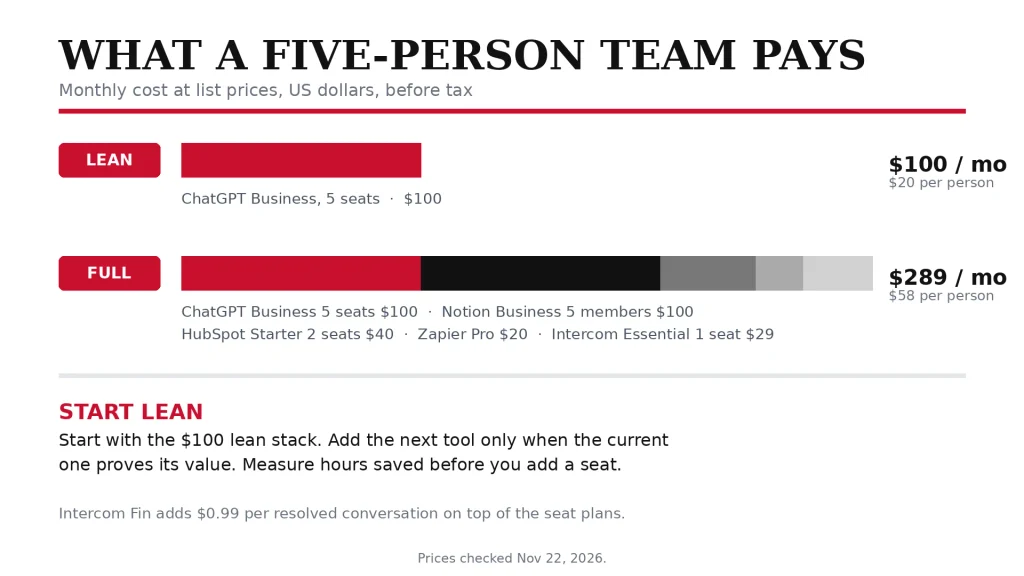
Skip buying everything at once. The stack costs about $100 a month for five people at the lean end. Start lean and measure hours saved. Add the next tool only when the current one proves its value. Watch the upgrade cliffs. HubSpot Professional still jumps to $890 a month plus a $3,000 onboarding fee.
Your 30-Day Rollout Plan
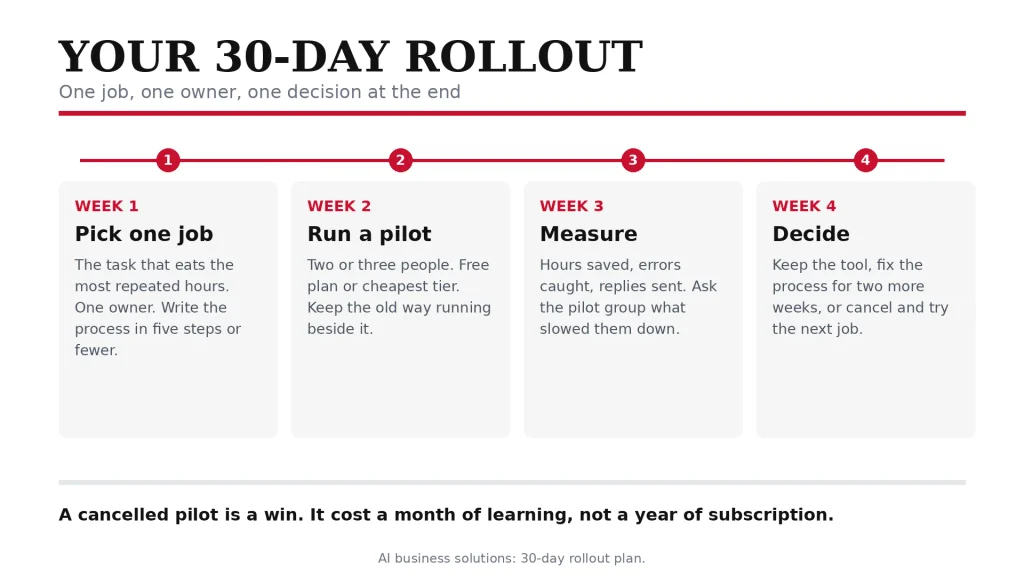
Week 1: pick one job and one owner. The job is the task that eats the most repeated hours. Write the current process in five steps or fewer. Week 2: run a pilot with two or three people on the free plan or the cheapest tier. Meanwhile, keep the old way running beside it. Week 3: measure hours saved, errors caught, and replies sent. Ask the pilot group what slowed them down first. Week 4: decide. Keep the tool, fix the process for two more weeks, or cancel and try the next job. A cancelled pilot is a win, not a failure. It cost a month of learning instead of a year of subscription.
How we checked: every price comes from the vendor’s pricing page or help center, checked on November 22, 2026. We did not run hands-on tests of every tool, so this guide makes no tested-performance claims.
Bottom Line
AI business solutions pay for small teams when they remove one repeated job. They cost less than $25 per person a month. They live inside tools the team already uses. Start with one shared assistant. Add a specialist for support or sales when volume justifies it. Automate one handoff at a time. New tools launch every month, so follow our latest AI updates to catch price changes. The teams that get value from AI picked one job, measured the hours, and kept only what worked.
AI Business Solutions: FAQs
Q: How to use ai in sales?
Use AI in sales for follow-up emails, lead scoring, and CRM updates, not for closing. Draft the first version of a follow-up with the deal history attached, let the CRM score leads by fit and activity, and keep a human on every message before it goes out. Start with the free HubSpot CRM and the Starter plan at $20 per seat a month, and measure reply rates for 30 days before you add more AI.
Q: How to use ai for seo?
Use AI for SEO to research keywords, outline pages, draft meta descriptions, and suggest internal links. Then edit every draft by hand, verify each claim against a primary source, and add real examples the AI cannot invent. Pages that publish unedited AI drafts read alike and lose readers, so treat AI as the first draft and a person as the publisher.
Q: How to grow ai automation agency brand awareness 2026?
Grow an AI automation agency brand in 2026 by publishing proof, not promises. Post short demos of real automations with real numbers, like hours saved or tasks removed, and name the tools used. Speak at local business events, answer questions in founder communities, and collect one written client result per project. Brand awareness for an agency comes from visible work, repeated weekly, not from ads.
Q: What can I do with ai? (AI business solutions)
With AI, a small team can draft documents and emails, summarize meetings, answer routine customer questions, score sales leads, research topics, outline articles, and connect apps so data moves without copying. Start with the job that eats the most repeated hours, use one tool for it, and keep a human checking the output. AI handles the first draft of a task, and a person handles the judgment.
Q: How do I use ai? (AI business solutions)
Start with one shared assistant, like ChatGPT Business or Claude Team, and give it one real job from your week, such as drafting replies or summarizing notes. Write a clear instruction, paste the source material, and check the output before you use it. Add a second tool only after the first one saves a named person at least two hours a week, and keep the old way running beside the pilot for the first month.


