


Alibaba released Qwen3.8-27B on August 14, 2026, and it quickly became the open model developers talk about most. This 27.8-billion-parameter dense model ships under the Apache 2.0 license, so anyone can download, modify, and use it commercially. For example, a 4-bit quantization needs only about 18 GB of memory, which means the model runs on a single 24 GB consumer GPU like the RTX 4090. Because it also handles text, image, and video input with a 262,144-token context window, it covers serious workloads without cloud bills. Therefore, this guide explains its benchmarks, VRAM needs, quantization options, and Ollama setup, so you can decide if it belongs in your stack.

What Qwen3.8-27B Is
It is the compact, deployable member of Alibaba’s Qwen3.8 family. It is a dense model, which means every one of its 27.78 billion parameters activates on every token. In contrast to mixture-of-experts designs that route tokens to subsets of experts, dense models are simpler to size for hardware: the quantization you download is the memory footprint you get.
The architecture mixes two attention mechanisms. Some layers use Gated DeltaNet linear attention, which scales efficiently with sequence length, while others use full attention for precise long-range dependencies. Because of this hybrid design, the model natively handles 262,144 tokens and extends to 1 million tokens through YaRN scaling in vLLM and SGLang. In addition, it accepts text, image, and video input and produces text output, which makes it a true multimodal workhorse.
Thinking mode is on by default, so the model writes out its reasoning before answering. However, you can control it per request with the reasoning_effort parameter, and you can disable it entirely for direct answers. For example, coding agents benefit from deep reasoning, while simple Q&A runs faster and cheaper with thinking off. Tool calling works through all major frameworks, including vLLM, SGLang, Ollama, llama.cpp, and LM Studio.

Qwen3.8-27B Benchmarks: What the Numbers Say
Alibaba’s launch numbers are striking. The company reported 61.7 on SWE-bench Pro, 73.0 on Terminal-Bench 2.1, 84.3 on OSWorld-Verified, and 89.2 on GPQA Diamond. For example, the SWE-bench Pro score beats the Claude Opus 4.6 Max result in Alibaba’s own comparison table. As a result, the release sparked immediate excitement among developers who want frontier-class coding agents without frontier-class infrastructure.
Treat vendor numbers with healthy caution, however. Every launch score comes from Alibaba, and several benchmarks are in-house or modified comparisons. The SWE-bench Pro comparison imports Anthropic’s result instead of rerunning it under identical conditions. Independent verification therefore matters, and early community testing has focused on real coding tasks rather than leaderboard positions.
Independent data looks strong too. Artificial Analysis scores the model at 52 on its Intelligence Index in xhigh mode, ranking it the top open-weight model on its list. However, the same evaluation notes the model’s verbosity: it generated roughly 160 million output tokens during testing against a 45 million median, because thinking mode runs long by default. If latency and token cost matter to you, set reasoning_effort explicitly instead of accepting the default. Our Flint coding model guide covers a similar open coding model, and the same benchmark skepticism applies there.
How Much VRAM Does Qwen3.8-27B Need
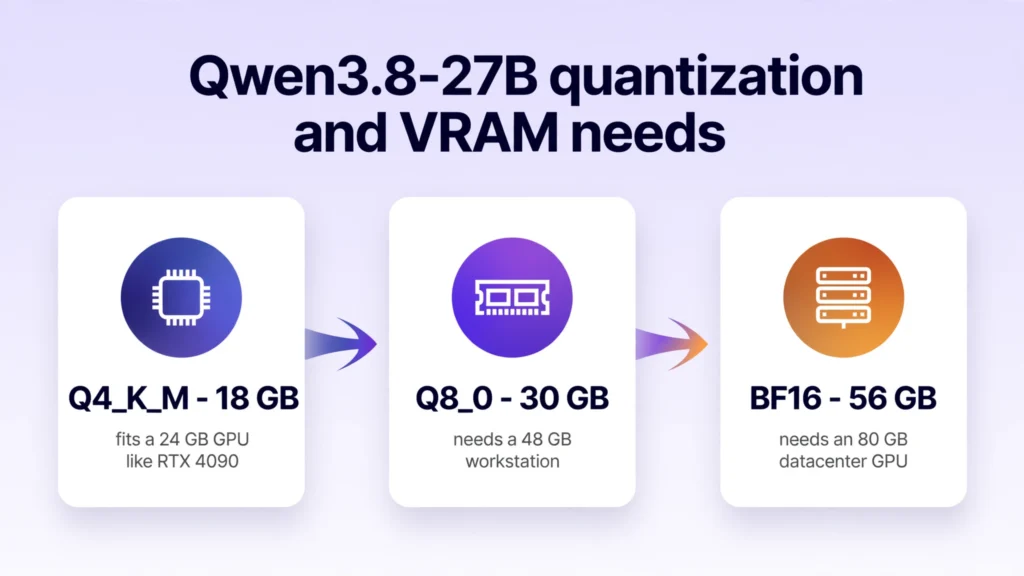
The short answer on Qwen3.8-27B VRAM needs is 18 GB for the model at 4-bit quantization, plus room for context. The popular Q4_K_M build downloads at about 18 GB, so a 24 GB card like the RTX 4090 or RTX 3090 runs it comfortably. For example, a 24 GB GPU handles the 4-bit model with 128K tokens of context. Because the model is dense, sizing is predictable: pick your Qwen3.8-27B quant, add context headroom, and you know your VRAM budget.
Higher precisions, however, need bigger cards. The Q8_0 build is about 30 GB and suits 48 GB workstations, while full BF16 precision needs roughly 56 GB and therefore a datacenter-class GPU. On a 16 GB card, however, smaller quants still work: a 14.25 GB build fits with 16K context, though quality drops slightly. A 12 GB card can only run 2-bit builds fully on GPU, which most testers find too degraded for serious work.
| Quantization | Download size | GPU needed | Best for |
|---|---|---|---|
| Q4_K_M | ~18 GB | 24 GB (RTX 4090/3090) | Best balance of quality and speed |
| Q8_0 | ~30 GB | 48 GB workstation | Higher fidelity, bigger rigs |
| BF16 | ~56 GB | 80 GB datacenter GPU | Maximum quality, servers |
| IQ4_XS | ~14.25 GB | 16 GB GPU | Tight VRAM budgets |
Measured speeds confirm the Qwen3.8-27B RTX 4090 sweet spot. On an RTX 4090, the 4-bit model generates about 46 tokens per second at 4K context and 38 tokens per second at 64K context, according to Hardware Corner’s Qwen3.8-27B tests. The older RTX 3090 reaches about 40 tokens per second at 4K context, which makes second-hand 3090s a price-conscious pick. Meanwhile, AMD reported up to 51.8 tokens per second on a Radeon AI PRO R9700 with day-zero support.
How to Run It with Ollama
Ollama is the fastest path to running it locally. Pull the model with ollama pull qwen3.8:27b, which downloads the 18 GB Q4_K_M build with image input and a 256K context window. Then start chatting with ollama run qwen3.8:27b. Because Ollama added the model in version 0.32.12, update your Ollama installation first if the tag is missing.
For the Qwen3.8-27B Ollama route, other tags cover different needs. For example, qwen3.8:27b-q8_0 gives higher precision at 30 GB, while the Qwen3.8-27B MLX tag targets Apple Silicon Macs. Similarly, LM Studio and llama.cpp run the Qwen3.8-27B GGUF builds from Unsloth and bartowski. However, older llama.cpp versions fail to load Qwen3.8 files with a missing-tensor error, so update to build b10896 or newer before troubleshooting anything else.
Two settings make the biggest difference. First, thinking mode is on by default and makes the model verbose, so turn it off for quick answers or set reasoning_effort to low or medium. Second, keep your context allocation realistic: a 32K context on a 24 GB card leaves comfortable headroom, while pushing to 128K works but leaves little margin. For agentic coding setups like the ones in our Mercury 3 speed guide, pair the model with a fast disk, because the 18 GB download and KV cache reward quick storage.
Qwen3.8-27B vs Qwen3.6-27B: Is the Upgrade Worth It
Qwen3.8-27B is a clear step up from Qwen3.6-27B, the April 2026 dense 27B model. As a result of focused training, Alibaba’s own figures show Terminal-Bench 2.1 rising from 63.4 to 73.0, DeepSWE 1.1 jumping from 13.3 to 42.2, and OSWorld-Verified climbing from 63.9 to 84.3. For example, the agentic coding gains are the largest, which matches the model’s positioning as a coding-agent workhorse.
The practical differences matter more than the scores. The newer model adds native video input, configurable thinking depth, and much stronger tool calling. However, it also thinks longer by default, so it uses more output tokens per task than its predecessor. If you already run Qwen3.6-27B in production, test 3.8 on your own prompts before switching, because the verbosity changes cost profiles. For new deployments, though, 3.8 is the obvious pick.
Qwen3.8-27B API Pricing
Self-hosting is free beyond hardware, but several providers also serve the model through APIs. DeepInfra lists $0.15 per million input tokens and $1.875 per million output tokens, with a 75 to 80 percent cache discount. At that rate, the blended cost is about $0.24 per million tokens, which makes it one of the cheapest ways to access a model of this capability without owning a GPU.
Meanwhile, Alibaba also brought the model to Cerebras for faster inference, and it runs on Alibaba Cloud’s own platform. Because pricing varies by provider, compare your expected input-to-output ratio before choosing. For example, heavy reasoning workloads with long thinking traces cost more on output-heavy pricing, so a provider with cheap output tokens wins there. DeepInfra’s Qwen3.8-27B benchmark comparison covers eight providers on speed and cost, which is worth reading before you commit.
Who Should Use It
It fits teams that want capable AI without sending data to the cloud. Because the weights are Apache 2.0, businesses can deploy the model on their own hardware for customer data, internal documents, and proprietary code. For example, a software agency can run a coding agent on a single RTX 4090 workstation instead of paying per-token API bills.
Similarly, it fits developers building local-first products. The multimodal input handles documents, screenshots, and videos, while the 262K context swallows entire repositories. However, it is not the right pick for everyone. If you need the absolute frontier on reasoning or you lack GPU hardware, a hosted API model remains simpler. But for the large middle ground of teams with one good GPU, this model hits the sweet spot.
Frequently Asked Questions
When was it released?
Alibaba released it on August 14, 2026, eleven days after the Qwen3.8-Max open weights. It remains the latest open-weight model in the Qwen3.8 family, since Alibaba has not announced Qwen 4 yet.
Is it free for commercial use?
Yes. Because the weights use the Apache 2.0 license, commercial use, modification, and distribution are all allowed. This is one of its biggest advantages over open models with restrictive licenses.
How much VRAM does it need?
About 18 GB for the 4-bit Q4_K_M build, plus context headroom. A 24 GB GPU like the RTX 4090 or RTX 3090 is the sweet spot. Smaller quants fit 16 GB cards with reduced context.
Can I run it on an RTX 4090?
Yes, the RTX 4090 is one of the best cards for it. The 4-bit model generates about 46 tokens per second at 4K context and 38 tokens per second at 64K context, with room for up to 128K context.
How do I run it in Ollama?
Run ollama pull qwen3.8:27b to download the 18 GB build, then ollama run qwen3.8:27b to start it. Make sure Ollama is version 0.32.12 or newer.
What are its benchmark scores?
Alibaba reports 61.7 on SWE-bench Pro, 73.0 on Terminal-Bench 2.1, 84.3 on OSWorld-Verified, and 89.2 on GPQA Diamond. Artificial Analysis independently scores it 52 on the Intelligence Index, the top open-weight result.
Is Qwen3.8-27B better than Qwen3.6-27B?
Yes, on every reported benchmark, especially agentic coding. It also adds video input and configurable thinking. However, it is more verbose by default, so tune reasoning_effort for your workload.
Does it support vision?
Yes. It natively processes text, image, and video input, and it produces text output. The 4-bit Ollama build includes image input support.
What is its context window?
The native context is 262,144 tokens, extendable to 1 million tokens through YaRN scaling in vLLM and SGLang. On a 24 GB GPU, practical contexts run up to about 128K at 4-bit.
Conclusion
Qwen3.8-27B is the most convincing open model you can run on a single consumer GPU today. It pairs a 27.8B dense architecture with 262K native context, multimodal input, and Apache 2.0 licensing, while its benchmarks rival models that need datacenter hardware. Because a 4-bit build fits on an RTX 4090 and API access costs from $0.15 per million input tokens, there is a deployment path for almost every budget. Therefore, if your team wants capable local AI without cloud dependence, start with ollama pull qwen3.8:27b this week and test it on your own workloads. Finally, the open-weights era keeps accelerating, and this model is its current sweet spot.