


Quick answer: Small business apps are tools that handle accounting, team chat, projects, customer records, design, and marketing. The six proven picks for 2026 are QuickBooks Online, FreshBooks, Asana, Slack, HubSpot CRM, and Canva, because each offers a free or low-cost start and covers one core job well. A five-person team can run it for about $129.20 per month.
Small business apps decide how fast a small team moves each day. The right pick removes busywork, while the wrong one adds another login and another bill. For that reason, this guide focuses on six that earn their place.
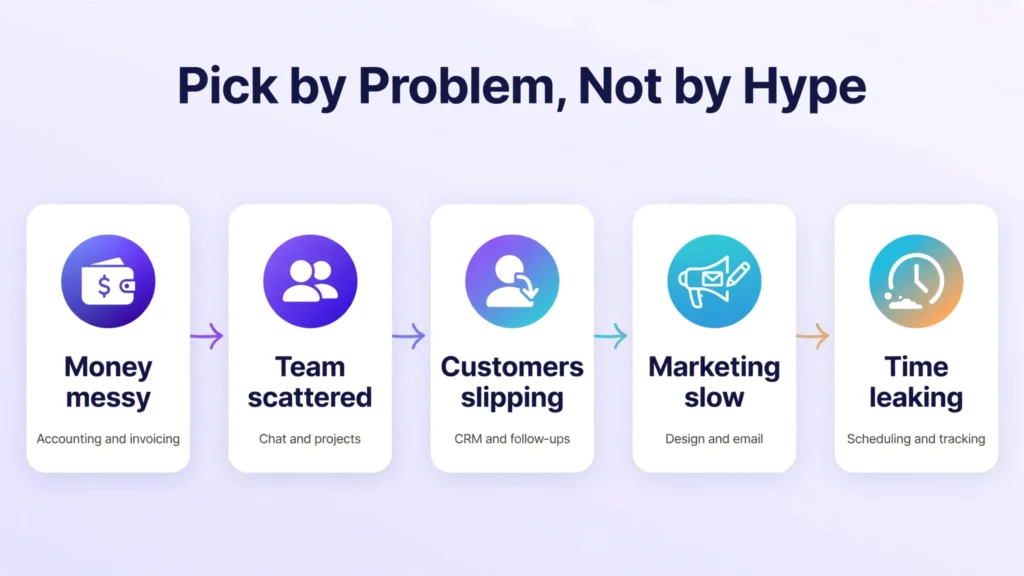
Most owners do not shop by feature list. Instead, they start with one pain, such as late invoices, and look for the simplest fix. Our guide to AI and business shows the same pattern. Therefore, every pick below names the pain it solves first and the price second.
How to Pick the Right Small Business Apps
The best small business apps match one job, one budget, and one team habit. Start with the job that costs the most time today. Because a tool only helps when it fits the work you already do, buy for the pain, not for the promise.
Next, check the free plan before you check the price. Free small business apps can carry a solo owner far, but free tiers hide limits. For example, Slack keeps only 90 days of message history on its free plan. In addition, count the cost per user.
Finally, look for AI features that save minutes every day. For example, QuickBooks sorts expenses on its own, Slack summarizes long channels, and HubSpot drafts follow-ups. If you also need web development tools, pick small business apps with open exports for an easy switch later. For teams that also ship code, our guide to agentic AI coding tools covers the same buy-for-the-job logic.
The 6 Small Business Apps at a Glance
This table compares the six small business apps on best job, free option, and starting price. Every price was checked on the official pricing page on 24 November 2026.
| App | Best for | Free option | Starting price |
|---|---|---|---|
| QuickBooks Online | Accounting and invoicing | Free plan, $0 | $38 per month, Simple Start |
| FreshBooks | Invoicing for service businesses | Free trial | $23 per month, Lite |
| Asana | Project management | Free Personal plan | $10.99 per user monthly, billed annually |
| Slack | Team chat | Free plan | $7.25 per user monthly, billed annually |
| HubSpot CRM | Customer records and follow-ups | Free, up to 1,000 contacts | $20 per seat per month, Starter |
| Canva | Design and branding | Free plan | Pro, paid upgrade |
1. QuickBooks Online: Small Business Accounting Apps That Scale
QuickBooks Online is the safest default among small business accounting apps, because it covers the whole money loop. It tracks income and expenses, sends invoices, and runs profit and loss reports. Simple Start costs $38 per month, and a free plan at $0 covers basic tracking.
The strongest feature is automated bookkeeping. QuickBooks learns how you categorize income and expenses, then matches new transactions. In addition, its AI layer sorts expenses and flags items that need a human look. As a result, the weekly books take minutes. Check the current plans on the official QuickBooks pricing page before you buy.
2. FreshBooks: Invoicing Built for Service Businesses
FreshBooks suits service businesses that live on invoices. Its Lite plan costs $23 per month and covers 5 billable clients, Plus costs $43 per month for 50 clients, and Premium costs $70 per month for unlimited clients. Team members cost $11 per month each, so count them in your budget first.
The standout feature is how fast an invoice goes out and gets paid. You can send a polished invoice, add a late fee rule, and accept cards, bank transfers, or Buy Now, Pay Later. In addition, Plus adds proposals, retainers, double-entry reports, and accountant access. See the full plan details on the official FreshBooks pricing page. However, the 5-client cap on Lite is tight, so move to Plus before it forces an upgrade.
3. Asana: Projects Without the Spreadsheet Chaos
Asana turns scattered tasks into one shared plan, and it ranks among the most reliable small business apps for repeat work. Teams track work in lists or boards, assign owners and due dates, and see who is blocked. The free Personal plan covers small teams, while Starter costs $10.99 per user per month billed annually.
The feature that saves the most time is the project template. A repeat job, such as onboarding a client, becomes a checklist the team reuses. In addition, Asana now adds AI help that drafts task lists and summarizes project status. Check the official Asana pricing page for the current rates.
4. Slack: Team Chat That Replaces Long Email Threads
Slack replaces long email threads with channels your team can search, and it is one of the most widely used small business apps for daily talk. Each project or client gets its own channel, and files, decisions, and links stay in one place. The free plan costs $0 and keeps 90 days of message history with up to 10 app integrations. Pro costs $7.25 per user per month billed annually, with unlimited history and integrations.
Slack also works as one of the more useful employee engagement tools for remote and hybrid teams. Quick check-ins and huddles keep a small team close without daily meetings. In addition, Slack AI summarizes long channels and recaps the day. However, the free 90-day history limit bites fast, because older decisions vanish from search. Therefore, budget for Pro once your team passes five people. See the official Slack pricing page for full details.
5. HubSpot CRM: Customer Engagement Tools That Start Free
HubSpot CRM is the free starting point for customer engagement tools, and it is the easiest of these small business apps to try without risk. The free plan covers 1,000 contacts and two users, with no time limit, and it includes contact records, deal pipelines, and email tracking. Starter costs $20 per seat monthly and adds automation and AI agents.
The real value is the single record. Every email, call, note, and deal lives in one timeline, so anyone on the team can pick up the thread. In addition, HubSpot now ships an Agent Builder and a prospecting agent that draft outreach. As a result, follow-ups stop slipping, because the system reminds you before the lead goes cold. For a related angle, see how businesses in ChatGPT are turning chat into a storefront. However, the free plan caps at 1,000 contacts, so a growing list will need a paid tier.
6. Canva: The Best Branding Tools for Startups on a Budget
Canva is the fastest way for a small team to look professional. It offers templates for social posts, presentations, and ads, plus a brand kit that locks in your colors, fonts, and logo. The free plan covers most templates, while Pro adds premium content and brand controls. Among the best branding tools for startups, Canva wins on speed, because a non-designer can ship a clean post in minutes.
The AI features do the heavy lifting. Magic Write drafts captions, and Magic Resize turns one design into every social size at once. In addition, shared folders let a team approve designs without emailing files back and forth. For a broader marketing view, our guide to the online marketing platform for small businesses shows how design fits into the wider marketing stack. However, templates can look generic, so change the fonts, colors, and layout to match your brand.
A Starter Stack of Small Business Apps for a 5-Person Team
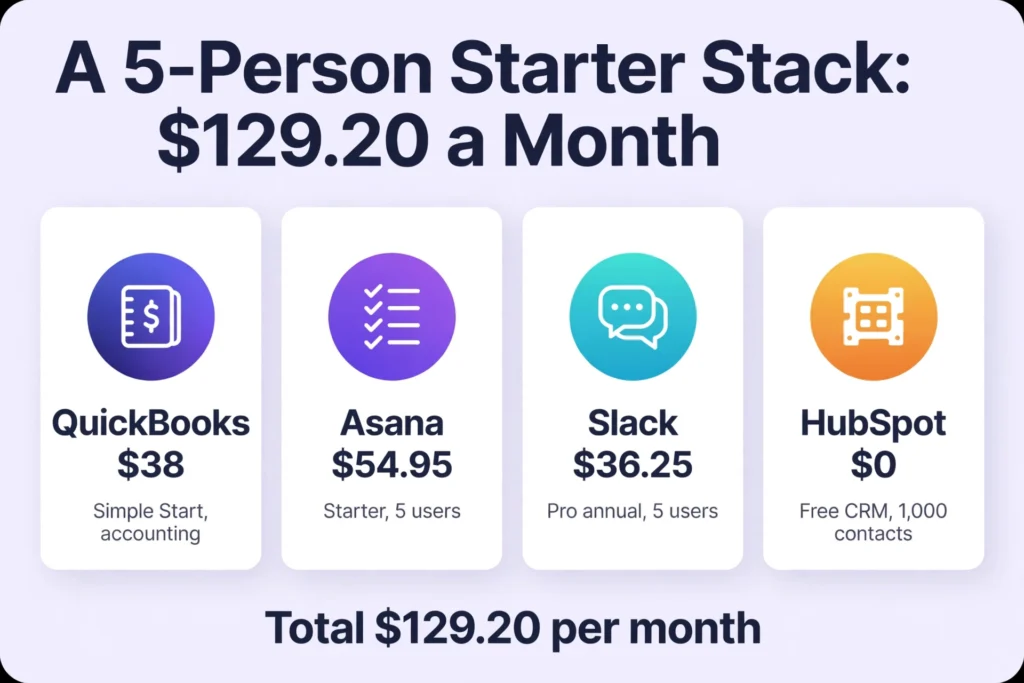
Buying apps one by one hides the real cost, so here is the honest monthly total. QuickBooks Online Simple Start costs $38 per month. Asana Starter costs $10.99 per user per month billed annually, which comes to $54.95 for five users. Slack Pro costs $7.25 per user per month billed annually, which comes to $36.25 for five users. HubSpot CRM costs $0 on the free plan. The total is $129.20 per month, checked on the official pricing pages on 24 November 2026.
That stack covers money, projects, chat, and customers, and it leaves design to the free Canva plan. When the team grows to ten people, Asana and Slack double, but QuickBooks and HubSpot stay flat until you outgrow their tiers. Therefore, start with this stack of small business apps, prove the habits for a month, and only then add paid extras.
How We Tested These Small Business Apps
We checked every price and free-plan limit on the official pricing page for each app on 24 November 2026. We also compared the top guides for this keyword and found that most list apps without adding up the real monthly cost for a team. For that reason, this article adds the one thing they all miss: a verified starter-stack total for a five-person team, plus the free-tier limits that decide whether a free plan lasts.
Small Business Apps in the Real World: Application and Pitfalls
A real small business rarely adopts six apps in one week. The pattern that works is one small business app per pain, one week apart. Start with the tool that fixes the loudest complaint, teach the team in one short session, and move on only when the habit sticks. For example, a bakery would start with QuickBooks for invoices, add Slack when orders get lost in texts, and add HubSpot for repeat orders.
The pitfalls are just as real. The first is paying for seats nobody uses, since per-user pricing punishes a bloated invite list. The second is keeping two tools for one job, such as invoicing in both QuickBooks and FreshBooks, which splits the records and doubles the work. The third is ignoring the free-tier cliff: Slack history, FreshBooks client caps, and HubSpot contact limits all arrive without warning. Finally, AI and automation for small business only helps when the workflow is clear first.
Small Business Apps: Frequently Asked Questions
What is a small business?
A small business is an independently owned company with a small team and modest revenue, usually run by its owner. Because the owner often handles sales, service, and admin at once, these businesses rely on simple small business apps.
What is considered a small business?
In the United States, the Small Business Administration generally treats a company as small when it has fewer than 500 employees, although the size standard varies by industry.
What does SME stand for?
SME stands for small and medium-sized enterprise. The term is common outside the United States, and it covers businesses that are too large to call small yet too small to call large.
What is an SME?
An SME is a small or medium-sized enterprise, usually defined by employee count and annual revenue, with limits that differ by country. In the European Union, a medium enterprise has fewer than 250 employees.
How can I market my business?
Start with the channels your customers already use. Post useful content on one social channel, collect emails with a simple offer, and ask happy customers for reviews. Our Ahrefs alternatives guide can help you track how your brand shows up in search without paying for an enterprise tool.
Final Verdict on These Small Business Apps
Small business apps work best when each one owns a single job. QuickBooks handles money, FreshBooks handles invoicing, Asana handles the plan, Slack handles talk, HubSpot handles customers, and Canva handles design. Together these small business apps cost about $129.20 a month for a team of five, and most of that value comes from habits, not features. Finally, pick the pain that costs the most time, start with the free plan, and add paid tiers only when the limit bites. For related reading, our guides to AI and business and AI automation for small business show how these tools fit a wider plan. The same care we used to compare Perplexity vs Claude went into this list: verified prices, clear limits, and no hype.


