
Canva Craft changes how small teams make marketing visuals, because it plans a design before it draws anything. Canva launched Canva Craft on October 22, 2026, as its first image model built and trained from scratch by Canva Research. For example, a social post, a poster, and a menu all need readable text in the right place, and that layout step is exactly where many image tools fail.
What Is Canva Craft?
Craft is Canva’s first in-house image generation model, and it marks a clear shift in Canva’s strategy. Now Canva owns the model, however, so it controls cost, quality, and speed for its own platform. Canva Research built the model with a team of more than 160 AI researchers and engineers, including people from Leonardo.ai, which Canva acquired in 2024. As a result, the model trains on millions of Canva templates, and that training shows in its design sense. It produces images up to 2K resolution, in more than 30 aspect ratios, or in a custom ratio you set yourself. Similarly, you can write prompts in any language, while on-image text renders in 55 languages.
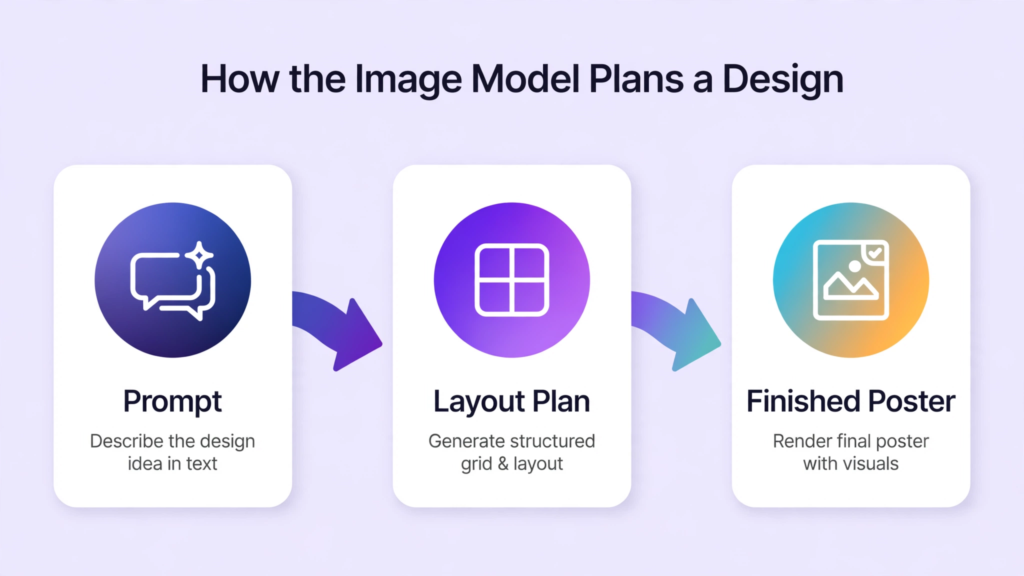
How the Plan Before Paint Method Works
Most image models turn a prompt straight into pixels, and text often lands in the wrong spot. Craft works differently, because it separates planning from rendering. Firstly, it reads your prompt and builds a layout plan that covers placement, scale, visual hierarchy, and text content. Then it renders the image from that plan. Because of this two-stage method, posters, flyers, menus, and social graphics keep their text readable and their layout balanced. On the other hand, marketing materials ranked lower, so you should test it on your own brand assets before you rely on it for client work. In short, the planning step is the real product here, not just another image generator.
DesignArena Ranking Explained
DesignArena is a crowdsourced leaderboard where people vote on image outputs, and Craft debuted at fourth place overall. Three OpenAI models ranked ahead of it, however, so Canva calls itself the second-ranked lab on the board. For example, the model ranked first of 87 for People and Portraits, first of 85 for Landscapes and Nature, and second of 85 for Abstract and Patterns. In contrast, it ranked fifth of 87 for Products, sixth of 85 for Marketing Materials, and fourteenth of 85 for Architecture. Therefore the honest read is simple: Craft shines on people, nature, and abstract design, while product and marketing layouts still need a human check. As a result, treat the ranking as a useful signal, not as proof that every output will suit your brand.
| DesignArena category | Rank | What it means for you |
| People and Portraits | 1st | Strong choice for lifestyle and team visuals |
| Landscapes and Nature | 1st | Strong choice for travel and outdoor content |
| Abstract and Patterns | 2nd | Good for backgrounds and brand textures |
| Products | 5th | Check product details closely before publishing |
| Marketing Materials | 6th | Test headlines and layouts on real briefs |
How to Use Canva Craft in Dream Lab
Craft lives in Dream Lab, and every Canva user can try it there. Firstly, open Canva and look for Dream Lab in the lower-left panel, or go straight to the Dream Lab page from the Canva homepage. Then choose Craft as the model, write a clear prompt, and pick your aspect ratio. Because the model plans first, a prompt with layout detail works better than a vague prompt. In addition, you can generate up to four images per prompt in Dream Lab, so you can compare options fast. Finally, send the best result into a Canva design, where Magic Layers and normal editing tools let you adjust text, colours, and placement. Meanwhile, remember that generation takes roughly 50 to 60 seconds end to end, according to Canva’s developer guidance, so plan batch work with that wait in mind.
- Open Dream Lab from the Canva homepage or the lower-left panel.
- Select Craft as the image model for your prompt.
- Write the exact on-image text, layout, and mood in plain words.
- Pick an aspect ratio, or set a custom ratio for the channel.
- Generate, compare the options, and send the winner into your design.

Pricing and AI Allowance
Canva has not published a standalone per-image price for Craft, and that point confuses many new users. Instead, generation uses your plan’s shared AI allowance, so the cost depends on your plan and on how much you generate. For example, Canva Free includes up to 20 Standard or Premium AI uses a month, while Canva Pro includes up to 200 Premium uses a month. Business plans include up to 400 Premium uses a month, however, so heavy teams should check their balance before a big campaign. Therefore the practical budget rule is clear: try it free on a small batch, measure how fast your allowance falls, and only then scale it into weekly content work.
| Canva plan | Monthly AI allowance | Best use |
| Free | Up to 20 Standard or Premium uses | Testing and occasional posts |
| Pro | Up to 200 Premium uses | Regular social and blog visuals |
| Business | Up to 400 Premium uses | Team campaigns and client work |
API Access for Developers
Developers can also use Craft through Canva’s public API, and that path matters for automation teams. The API model name is craft_v1_2k, and image generation consumes the user’s AI credit allowance, just like Dream Lab does. Because the API sits in Preview, breaking changes can arrive without notice, and public apps that use Preview APIs cannot pass review for general distribution yet. Therefore developers should treat the API as a tool for internal workflows and private testing, not as a finished public integration. In addition, Canva says MCP support is coming soon, and that support would let assistants such as ChatGPT and Gemini generate with the model inside larger tasks. For now, however, the safest automation plan pairs the API with a human review step, so no unreviewed image reaches a client or a live campaign.

Canva Craft vs Ideogram Vector
Ideogram launched Vector 1.0 on the same day as Craft, October 22, 2026, and the two tools solve different problems. Ideogram Vector returns editable SVG design files, so designers can open every shape and colour in Illustrator or Figma and keep editing. Craft, on the other hand, returns images that drop into editable Canva designs, so marketers can finish a post fast without leaving Canva. For example, a designer who must hand over a logo file should pick Ideogram Vector, because a flat image cannot match an editable vector file. Meanwhile, a marketing team that needs a finished social graphic today should pick Craft, because the full Canva editor sits right behind it. Our earlier Ideogram Vector guide explains that editable-file workflow in detail, and it pairs well with this guide when you compare the two launches. In addition, Ideogram charges per output, with text to vector from about 13 cents to 32 cents, while Craft uses your plan allowance with no separate per-image price. As a result, the choice comes down to deliverable: an editable file, or a finished Canva design.
| Feature | Craft | Ideogram Vector |
| Main output | Image up to 2K editable in Canva | Editable SVG design file |
| Best user | Marketers and small teams | Designers who need source files |
| Text handling | Planned layout text in 55 languages | Vector text you can edit later |
| Pricing model | Shared plan AI allowance | Per output about 13 to 32 cents |
For Marketing Teams
Marketing teams gain the most from Craft when they use it for repeatable design jobs. For example, weekly social posts, event flyers, menu updates, and presentation covers all follow a template, and the planning step keeps those layouts consistent. Because outputs land in Canva, a team member can swap a headline, change a colour, and export for each channel without rebuilding the design. However, brand control still needs a human eye, because the model can drift from exact brand colours and fonts. Therefore set a simple rule: use the model for drafts and variations, then let a human approve every asset before it goes live. In addition, keep a prompt library of your best-performing prompts, because consistent prompts produce more consistent campaigns. Finally, track allowance use per campaign, so a viral week does not eat next month’s budget. Readers who want a broader speed angle can also see how fast models change work in our Mercury 3 guide, which covers a very different kind of AI speed story.
Limits and Honest Caveats
Craft is a strong first model, but it has real limits you should know before you commit. Firstly, there is no standalone price, so finance teams cannot budget a fixed cost per image. In addition, the DesignArena debut ranking rests on early human votes, and Canva itself reports the category ranks, so independent long-term testing still matters. Finally, the faster Craft-fast and Craft-ultrafast versions and MCP support have no dates yet, so do not plan a launch around them. Because of these limits, the smart move is to adopt it as a design accelerator inside Canva, not as a replacement for designers, brand guidelines, or final quality control.
Frequently Asked Questions
What Is This New Model?
Craft is Canva’s first in-house image model, launched on October 22, 2026. It plans a layout before it renders an image up to 2K, with text in 55 languages.
Where do I find Canva Craft Dream Lab access?
You find Canva Craft Dream Lab access in Dream Lab, from the lower-left panel in Canva or from the Dream Lab page on the Canva homepage. All Canva users can try it there.
How does Canva Craft pricing and AI allowance work?
Canva Craft pricing and AI allowance work through your plan’s shared allowance, not a separate per-image price. Free plans include up to 20 uses a month, Pro up to 200 Premium uses, and Business up to 400.
Is It Free to Try?
You can try it at no extra charge inside your Canva plan, however, generation still consumes your AI allowance. Once that allowance runs out, you must wait or upgrade your plan.
How does Canva Craft vs Ideogram Vector compare?
Canva Craft vs Ideogram Vector comes down to output type. The former gives images editable in Canva, while the latter gives editable SVG files for designers. Pick the tool that matches your deliverable.
What does the Canva Craft DesignArena ranking prove?
The Canva Craft DesignArena ranking shows a fourth-place debut overall, with first place for portraits and landscapes. It signals strong design sense, but it does not guarantee perfect brand results.
Can developers use Canva Craft API access today?
Yes, Canva Craft API access exists through the public API with the model name craft_v1_2k, however, the API is in Preview. Therefore use it for internal work until Canva confirms general availability.
When will Craft-fast and Craft-ultrafast arrive?
Canva has not announced dates or prices for Craft-fast or Craft-ultrafast. For now, treat them as coming soon, and plan current work around the standard model.
Should Marketing Teams Replace Designers With It?
No, Canva Craft for marketing teams works best as a draft and variation tool. A human should still approve brand colours, fonts, and final quality before publication.
Conclusion
Craft earns its place in a marketing toolkit, because it plans before it paints and it lives where teams already design. Therefore try it in Dream Lab this week, test it on your own brand briefs, and watch your AI allowance as you scale. Finally, if you want more on this launch, read the BetaNews launch report, the detailed Craft review, and the step-by-step Craft guide for extra detail.